In the second half of January we focused on upgrading the admin experience, making the product look and feel like one product, and laying the groundwork for how we’ll handle plans and leads. Here’s what we built.
Admin upgrade and theme
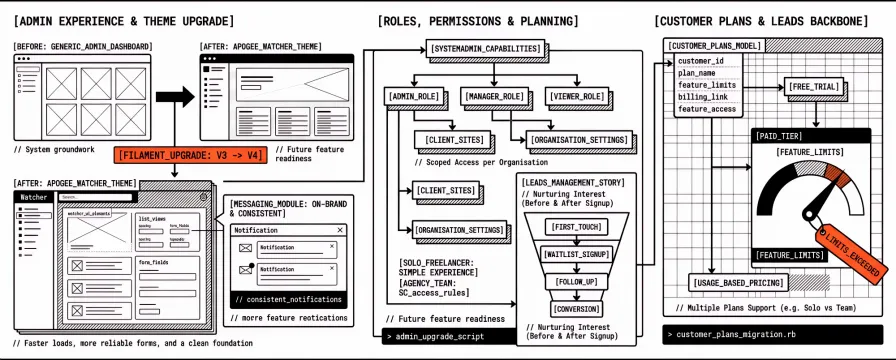
We completed the upgrade from Filament v3 to v4. Filament is the framework we use for the admin panel—lists, forms, and detail views. The v4 upgrade wasn’t just a dependency bump; we went through the breaking changes and made sure every screen still works and that we’re on a supported, modern base. The admin now runs on the latest Filament release, which gives us better performance and a cleaner foundation for the next features. For our users, that means faster list loads, more reliable forms, and a stack that’s aligned with where the ecosystem is going so we can keep adding features without fighting the framework. We’d rather do the upgrade once and then move on to building product; that’s what we did.
We also introduced a dedicated Watcher theme. Until then the admin used more generic styling; now it uses our own palette, spacing, and typography so it feels like Apogee Watcher rather than a generic dashboard. We expanded the messages module so in-app communication—notifications, confirmations, and any future messaging—is consistent and on-brand. Small details, but they matter when you’re in the product every day: you should feel like you’re using one coherent tool, not a patchwork of screens.
Roles, permissions, and planning
We want agencies and teams to use Watcher with clear roles and permissions—who can see which sites, who can change settings, and who can manage billing or organisation settings. We documented our approach to role-based access and how we’ll roll out sysadmin capabilities. That work is still in progress, but the direction is set: we’ll support multiple roles (e.g. admin, manager, viewer) and make it easy to scope access per organisation so that agencies can give clients or junior staff limited access without exposing everything. So if you’re a solo freelancer you get a simple experience; if you’re an agency with account managers and developers, you’ll eventually be able to give each person the right level of access. We also updated our solutions and positioning so that leads management is explicitly part of the product story: we’re not only monitoring performance; we’re helping you capture and nurture interest before and after signup. That’s a differentiator we want to lean into.
Customer plans and leads
We built the Customer Plans module. That means we now have a data model and admin screens for customer plans—what each customer is on, what’s included, and how it ties into billing and feature access. We added the resources in the admin and fixed a few corrections so plans are manageable end to end. This is the backbone for free trials, paid tiers, and eventually usage-based or seat-based pricing. When we launch pricing, we won’t be retrofitting it; the structure is already there. You’ll be able to see which plan a customer is on, what limits or features that plan includes, and how that flows through to what they can do in the product. For agencies, that also sets us up to support multiple plans (e.g. solo vs team, or different site limits) without reworking the data model later.
We also strengthened the leads side. We wrote down how we want to manage leads—from first touch (e.g. waitlist or early-access signup) through follow-up and conversion. The implementation plan makes it clear what we’re building in the next phase: better capture, segmentation, and reporting so you can see how prelaunch and early-access efforts are performing. Combined with customer plans, that gives us a clear path from “interested visitor” to “customer on a plan.” For our users, that means we can run a proper early-access programme: collect signups, segment them, invite them when we’re ready, and move them onto a plan when they convert—all without ad hoc spreadsheets.
Why this matters: January was about making the product feel like one product (theme, Filament v4) and making sure the business side can support real users. Plans and leads aren’t glamorous, but they’re what let us go from “we’re building something” to “you can sign up, get invited, and land on a plan.” The next step is to wire that into the actual flows—invitation emails, dashboards, and alerts—so the product is not only structured correctly but actually usable day to day.
Next up: handling expired access gracefully, prelaunch invitations so we can invite leads into the product, sysadmin and customer dashboards, and the alert services that will notify you when performance changes. We’ll cover that in the February changelogs.