In the second half of February, we polished the blog, added RSS, made discovery visible in the admin, and cleaned up permissions and UX. No single blockbuster—just a solid set of improvements that make the product more usable and the blog more useful. Here’s what we built.
Discovery attempts in the admin
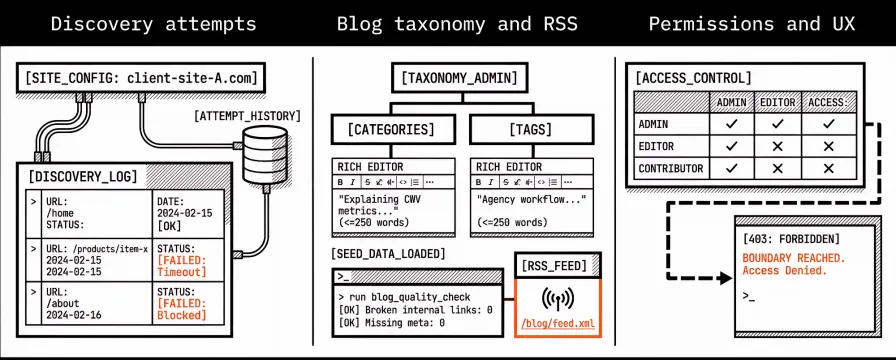
When we automatically discover pages on a site you add, we now record each attempt—success or failure—in the database. The admin has a dedicated list and detail view for discovery attempts, plus a relation so you can see attempts directly from the site they belong to. So when you add a new client site and want to know why only a subset of pages showed up, or why a run failed, you can open the site, filter by date or status, and see exactly what we tried and what the outcome was for each URL. No more guessing from logs; the history lives next to the site it belongs to.
We also improved error handling and behaviour in the discovery service and the background job that runs it: clearer errors, better retries, and documentation updated so the admin accurately reflects how discovery runs and what to do when something goes wrong. If a run fails because of a timeout, a blocked URL, or a misconfiguration, you’ll see a meaningful message instead of a generic failure and can decide whether to fix the site, tweak settings, or rerun discovery. Over time, we’ll keep refining this so that adding a new site and seeing which pages we found (or didn’t) is a smooth, transparent process you can trust when onboarding new clients.
Blog taxonomy and RSS
We refined how categories and tags work. You can now add optional descriptions to each category and tag—short blurbs that explain what the section is about. We store those in the database and show them in the admin with a rich editor, and we added seed data so new installs have sensible defaults. Those descriptions show up on the category and tag archive pages, so when someone lands on Core Web Vitals or agency operations they get a quick explanation of what they’ll find there. It’s a small touch but it makes the blog feel more intentional and easier to navigate. The sitemap now only includes tags and categories that have at least one published post, so we don’t expose empty or draft-only sections to search engines. Category and tag archive pages use a two-column layout so more posts fit on screen and the page feels easier to scan. We capped taxonomy descriptions at 250 words so they stay concise and useful, and we only show internal “related” links for tags and categories that actually have posts—no dead ends. We added a blog post quality-check command. It runs through published posts and flags issues (e.g. missing meta, broken internal links) so we can fix them before they pile up. That’s especially useful as we add more posts—catching broken links or missing descriptions early keeps the blog in good shape for both readers and search. We added the blog RSS feed at /blog/feed.xml. You can subscribe in any reader; we added the feed link in the layout so browsers and tools can discover it automatically. If you prefer to follow via RSS instead of the website, you’re covered. We’ll keep the feed updated as we publish so you don’t have to remember to check back.
Permissions, UX, and content planning
We refined how access control works so it’s consistent and predictable. We added a dedicated “forbidden” (403) view so when you hit a permission boundary you see a clear message instead of a generic error—useful as we roll out roles and multi-tenant access. We also added a read-only banner for contexts where you can view but not edit, so it’s obvious why the “Save” button isn’t there. We fixed an internal link bug that could send you to the wrong place from certain blog or admin screens. The lead campaign sidebar menu had a glitch; we fixed that so the right items show up in the right order. Small fixes, but they reduce friction when you’re moving between leads, campaigns, and reports.
On the content side we updated the marketing calendar and added planning for the next batch of drafts, competitive analysis, and customer plans. We also updated our roadmap and outreach planning so the next quarter’s content and link-building efforts are aligned. That way the blog stays on theme and we can start building authority in the performance monitoring space.
That’s it for February. We’re in a good place: the site is live for testing and early access, the blog has taxonomy and RSS, discovery is visible in the admin, and permissions and UX are a bit cleaner. The next changelog will cover early March: more discovery and alerting work, and further content and UX polish. Thanks for following along.