In the first half of March we focused on how alerts reach admins and self-service account management, while still doing testing and collecting feedback from our beta testers.
Alerts — site-level budget violation digest
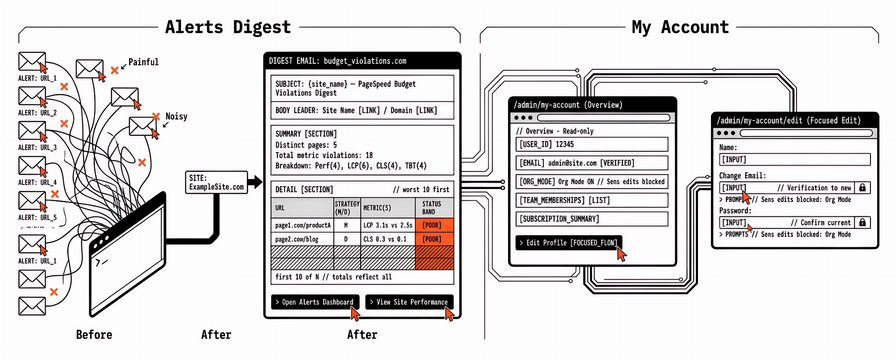
The main user-facing delivery is a site-level alert digest for budget violations. Agencies rarely monitor a single URL per client—they track many pages per site, and each scheduled budget evaluation can touch the whole surface. Previously, when a budget check found violations across many pages, we sent one email per page per admin. A single run could therefore deliver dozens of near-duplicate messages to the same inbox: painful to triage, easy to miss which URLs mattered most, and noisy enough that some teams would tune out alerts entirely.
We now send one digest email per site per run (per alert channel; for email, one message per admin per site when that run notifies). Subjects use {site_name} — PageSpeed Budget Violations Digest; the body leads with site name and domain (linked into the admin) so the property and entry point are obvious.
Each digest includes:
- Summary: distinct pages with violations, total metric violations, and a breakdown by metric type (e.g. performance score, LCP, CLS, TBT)—so you see scale and whether issues cluster in one metric or spread across several. Site name and domain stay linked to the site record.
- Detail: up to 10 pages, worst first (by breach severity). Per row: URL, strategy (mobile/desktop), violated metrics with threshold vs actual, and Good / Needs improvement / Poor bands aligned with Core Web Vitals. Rows link to the alerts dashboard for that page.
- Large sites: “first 10 of N” when needed; totals still reflect all violations in that run, not only the ten rows.
- CTAs: “Open Alerts Dashboard” (site-scoped) and “View Site Performance.”
Alert creation is unchanged (gating, cooldowns, reminders, admin recipients). The digest lists only alerts from that budget-check run, not every unresolved row in the database; we deduplicate same page/strategy/metric. What changed is email batching and layout. Styling matches Victor Mono / brutalist—the same look as the rest of the product.
This sets the pattern for Slack and webhooks later: one notification per site with a summary plus a short worst-offender list, instead of mirroring every page as a separate ping—the same mental model whichever channel we add next.
My Account — overview vs Edit Profile
We tightened My Account so everyday profile work is clearer:
- The main My Account page (
/admin/my-account) stays an overview: read-only name, email, verification status, pending email if any, team memberships, and subscription summary. - Sensitive edits move to a dedicated Edit Profile flow (
/admin/my-account/edit), reached from a primary “Edit Profile” action—name, email change (verification link to the new address), and password in one focused place instead of long inline forms on the overview page.
Read-only org mode still blocks email and password changes on both pages, with a short explanation. Navigation remains under the admin user menu; the edit page is intentionally not a separate top-level sidebar item.
What’s next
More work on discovery, alerting, and channels (e.g. Slack/webhooks following the digest pattern), plus continued improvements on our site and more testing with our early partners.