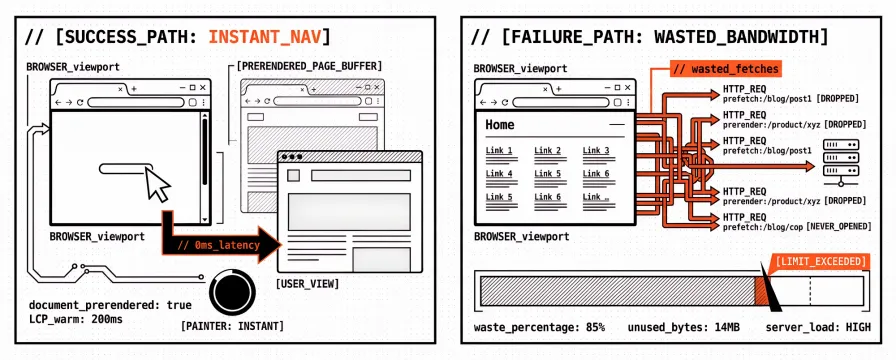
The Speculation Rules API is a browser feature: a small JSON document tells Chromium-class browsers which same-origin (and carefully chosen cross-origin) URLs may be fetched or fully prerendered before the user finishes navigating. Done well, the next page can feel almost instant. Done carelessly, the site pulls HTML, scripts, and third-party tags for destinations nobody opens, and the retainer report still treats a warmer next-page as if the cold homepage Largest Contentful Paint (LCP) had improved.
That contrast is the whole agency problem. Instant navigation and wasted bandwidth are two sides of the same hint. Chrome’s own guidance frames speculative loading as a trade-off against memory and network cost, not as a free Core Web Vitals patch for the URL you already measured. What follows is a platform how-to: what the API is, when prefetch is enough, when prerender is worth the cost, how list and document rules plus eagerness change waste, what to exclude, how Speculation Rules differ from classic resource hints, and how to verify without trusting a single Lighthouse paste.
For WordPress Core defaults and plugin toggles, keep WordPress Speculation and Prerender Plugins vs Core Web Vitals beside this guide. For rel=preload, prefetch, and preconnect on the current page, use Preload, Prefetch, and Preconnect: Resource Hints for Faster Core Web Vitals. Broader WordPress monitoring context sits in WordPress Performance Monitoring: A Complete Guide.
What the Speculation Rules API is
Speculation rules are progressive enhancement. Unsupported browsers ignore the script or HTTP header. Supported Chromium browsers (Chrome, Edge, and related builds at current versions) may act on the rules subject to memory pressure, Data Saver, battery, and other heuristics. Every rule is a hint, not a contract that the next URL will always be warm.
Authors typically deliver rules in one of two ways:
A
<script type="speculationrules">block in HTML with a JSON object.An HTTP
Speculation-Rulesresponse header that points at a rules document the browser can fetch.
MDN’s Speculation Rules API overview and Chrome’s prerender pages guide are the canonical references for syntax and browser behaviour. The WHATWG HTML living standard also documents the feature for implementers. You do not need to memorise every key on day one. You do need to know which action you asked for (prefetch or prerender), which URLs are in scope, and how eager the browser may be about starting that work.
Unlike a classic rel=prefetch link that names one URL, Speculation Rules can describe patterns: a short list of exact URLs, or document rules that watch same-site links matching include and exclude selectors. That flexibility is why the same API underpins both careful “instant navigation” on a product-to-product path and noisy waste when a theme prerenders every footer link on every view. Agencies inherit both outcomes under one marketing phrase, so the implementation detail matters more than the slogan.
Prefetch vs prerender: cost and Core Web Vitals upside
Two modes matter in almost every client conversation. The names look similar. The cost does not.
| Mode | What the browser roughly does | Typical upside | Main cost |
|---|---|---|---|
| Prefetch | Fetches the document early (and often related subresources, depending on browser behaviour) | Shorter wait before paint once the user navigates | Extra bytes and origin load if the user never clicks |
| Prerender | Loads the page in a hidden background state, ready to activate | Near-instant next view; some layout work can finish before activation; Interaction to Next Paint (INP) on the activated page can look better because work already ran | Runs client JavaScript earlier; analytics and personalisation bugs; higher CPU and memory; more wasted work on wrong guesses |
Chrome’s documentation is explicit that prerender can drive near-zero perceived LCP for the activated navigation when load-time layout shifts finish before the user sees the page. The same docs warn against over-prerendering. Prefetch is the conservative default for most retainer sites: you spend less when the guess is wrong, and you still shorten the network wait when the guess is right.
A useful reporting rule: label whether the client asked for a faster next navigation or a better first cold load. Speculation Rules primarily serve the next navigation. They do not replace compressing the LCP image, fixing render-blocking CSS, or reducing main-thread work on the URL you audit in isolation. If the PDF claims “we added Speculation Rules” beside an improved cold homepage Lighthouse score without a dated before/after on the same lab URL, treat the claim as incomplete until someone shows the measurement design.
List rules vs document rules, and what eagerness changes
Rules come in two common shapes.
List rules name explicit URLs (or a small set of URLs) under prefetch or prerender. They suit high-confidence next steps: cart → checkout, category → top SKU, docs index → getting-started. Waste stays bounded because the set is small and human-reviewed.
Document rules tell the browser to consider links already in the current document, usually filtered with where conditions (href matches, selector matches, and exclude patterns). They suit large catalogues where hand-listing every product URL is impossible. Waste grows when the include pattern is broad and eagerness is high, because many visible links become speculation candidates.
Eagerness controls how soon the browser may start speculative work. Chrome documents levels such as conservative, moderate, and eager (exact names and defaults can shift with the platform; always check current Chrome docs when you ship). Roughly:
More conservative settings wait for a stronger signal (for example a pointer down or a clearer intent) before spending network.
More eager settings start earlier, which can feel snappier when the user does click through and more expensive when they scroll past without clicking.
Agency practice that ages well starts with prefetch and a conservative or moderate eagerness on document rules for same-site content links. Prerender then stays on a short list of high-confidence destinations, or on a tightly filtered document rule, until evidence says otherwise. Teams usually widen eagerness only after a before/after lab row exists and Support can catch analytics double-fires.
Document rules also need an exclude list from day one. Logout links, “add to cart” URLs that mutate state via GET, login walls, download endpoints, and admin paths should not be speculative candidates. Chrome and MDN both stress that speculative loads must be safe to run without the user’s final intent. If a GET request logs the user out or depletes inventory when fetched in the background, that URL does not belong in a speculation rule.
What wastes bandwidth (and how to stop it)
Bandwidth waste is the product of three choices: mode (prerender costs more than prefetch), eagerness (earlier starts mean more abandoned work), and URL scope (document rules over the whole site versus a short list). Instant navigation marketing rarely names those three levers. Teams ship eager prerender under that banner, then notice the cost when mobile users complain about data use or when Support asks why a logout link fired in the background.
Patterns we see on retainers:
Sitewide prerender with eager settings. Themes and “instant page” plugins sometimes emit prerender rules for every internal link. Mobile users on metered connections pay for pages they never open. Memory pressure on mid-range phones can also cancel speculation, so the feature fails quietly while the HTML cost remains.
Speculating across personalised or authenticated shells. Prefetching a dashboard HTML shell that immediately redirects or personalises can create odd flashes, duplicate analytics, or stale baskets when the prerender activates. Anonymous catalogue and content paths are safer first candidates.
Overlapping speculation and aggressive resource hints. A page that already preloads three fonts, preconnects six origins, and prerenders five next URLs competes with itself for bandwidth. Speculation Rules and resource hints solve different problems; stacking both without a budget is a common lab regression.
Measuring the wrong navigation. Teams celebrate a prerender activation in DevTools, then paste a cold Lighthouse run that never used speculation, or the reverse: they warm the page in the profiler and report it as a typical first visit. Cold load versus speculative activation needs an explicit label in the client report, or the next person cannot defend the number.
Stopping waste is mostly subtraction: a narrower URL set, prefetch until a specific funnel step justifies prerender, lower eagerness when Support sees battery or data complaints, and exclude lists for unsafe or low-value links. On WordPress, Core’s conservative defaults and plugin prerender toggles already encode those trade-offs. The dedicated WordPress speculation guide is the place to compare them rather than inventing a second stack of rules on top of Core.
How Speculation Rules differ from preload and link prefetch
Search results and audits often mash three ideas together. A retainer runbook that names each mechanism separately saves a week of crossed wires between SEO and engineering. The table below is the short version we paste into tickets when someone asks whether “prefetch” means a link hint or a Speculation Rules action.
| Mechanism | Primary job | Typical CWV target |
|---|---|---|
rel=preload / preconnect / dns-prefetch | Prepare critical work for the current document | Current-page LCP and connection setup |
rel=prefetch (classic link hint) | Hint a future navigation resource at low priority | Next navigation assist, limited scope |
| Speculation Rules API | Structured prefetch or prerender of next documents (list or document rules) | Next navigation feel; not a substitute for current-page LCP work |
Resource hints belong when the LCP image is late-discovered, when a font must load early, or when a critical third-party origin needs an early connection. Speculation Rules belong when the product goal is a faster transition to a likely next URL. Using Speculation Rules to “fix LCP” on the landing URL alone usually disappoints, because the cold first paint still depends on that URL’s own HTML, CSS, and LCP resource.
If a PageSpeed Insights opportunity mentions unused preloads, that is a resource-hint problem. If Chrome’s speculative loads panel shows cancelled prerenders or unexpected URLs, that is a Speculation Rules problem. Put the artefact name in the ticket so the next person does not “fix LCP” by editing the wrong layer.
How to verify speculation without trusting a single Lighthouse score
Verification has two halves: did the browser speculate as intended, and did field or lab Core Web Vitals move in a way you can defend.
Browser behaviour. In Chromium DevTools, use the speculative loading / prerender instrumentation Chrome documents for the current version (Application or related panels, plus performance traces when you need timing). Confirm which URLs entered prefetch or prerender, which activated, and which were cancelled. Cancelled speculation is normal under memory or Data Saver constraints; a flood of cancelled prerenders on mid-range mobile is a signal to lower eagerness or switch to prefetch.
Lab schedules. Keep a cold-load lab URL set that does not depend on hover or prerender activation. That column answers “what does a first visit still feel like?” Add a separate note or second scenario when you intentionally activate a speculated route. Date both. Without dates and URL labels, the next person on the account cannot tell whether speculation helped or whether someone changed the hero image in the same sprint.
Field reality. Chrome UX Report (CrUX) and Search Console still summarise real-user experiences with lag and aggregation rules. Speculation that only fires for a minority of Chromium users on desktop will not rewrite a sitewide mobile LCP fail overnight. Pair speculation work with the same monitoring discipline you already use for other delivery changes: scheduled lab rows per key template, alerts when a URL regresses, and client language that separates next-navigation feel from cold-load vitals.
Apogee Watcher is built for that monitoring layer across many client properties: recurring PageSpeed / CrUX-oriented checks, history you can put in a retainer PDF, and alerts when a template drifts after a theme or plugin ships new speculation defaults. Speculation Rules do not replace that schedule. They make the schedule more important, because wrong guesses fail quietly until bandwidth and support tickets speak up.
FAQ
What is the Speculation Rules API?
It is a web platform API where JSON rules tell compatible browsers which pages they may prefetch or prerender before navigation completes. Delivery is usually a type="speculationrules" script or a Speculation-Rules header. Unsupported browsers ignore the rules.
Is prefetch the same as prerender?
No. Prefetch fetches the document early. Prerender loads a hidden page ready to activate, which costs more CPU, memory, and script side effects when the guess is wrong. Prefetch is usually enough until a specific next step justifies prerender.
Does “instant navigation” require prerender?
Not necessarily. Conservative prefetch on high-traffic next URLs often improves the wait before paint without running a full hidden page. Prerender is the stronger (and costlier) option when the next step is highly predictable and you have tested analytics and personalisation side effects.
Will Speculation Rules fix my Lighthouse LCP on the homepage?
Not reliably as a cold-load fix. They mainly improve the next navigation when the guess is right. Fix discoverable LCP resources and render-blocking work on the current URL first; use Speculation Rules for transition feel afterward.
How is this different from WordPress speculative loading?
WordPress 6.8 and the Speculative Loading plugin are CMS opinions about which Speculation Rules to emit. This guide covers the API choices underneath. For Core versus plugin settings, use WordPress Speculation and Prerender Plugins vs Core Web Vitals.
What should never be in a speculation rule?
URLs that are unsafe to fetch without final user intent: logout, state-changing GET handlers, sensitive account flows you have not tested for double analytics or race conditions, and low-value links that inflate waste without helping the funnel.
Ship conservative rules, then keep the cold-load schedule
Agency technical leads who inherit “instant navigation” requests can treat Speculation Rules as a controlled hint, not a sitewide prerender switch. Prefetch and moderate document rules usually carry the first release; prerender stays on high-confidence paths; unsafe URLs stay on the exclude list. A dated cold-load lab column keeps first-visit Core Web Vitals honest after the feature ships, so the next-page feel and the first-visit report do not get collapsed into one unverifiable claim.
That lab history and those regression alerts across client sites are what Apogee Watcher is for when spreadsheets stop scaling. Start a trial or run a free PageSpeed check on the templates you care about most. Leaving aggressive prerender on without a schedule is how bandwidth burn and muddy reports show up in the same quarter: the next-page demo still looks instant, and the first-visit column quietly drifts.
References
Speculation Rules API (MDN)
Prerender pages in Chrome (Chrome for Developers)
Resource hints (web.dev)
WordPress Speculation and Prerender Plugins vs Core Web Vitals (Apogee Watcher)
Preload, Prefetch, and Preconnect: Resource Hints for Faster Core Web Vitals (Apogee Watcher)
WordPress Performance Monitoring: A Complete Guide (Apogee Watcher)