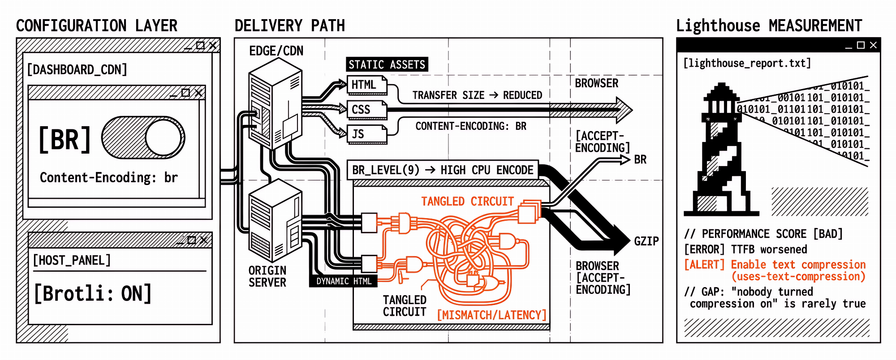
The CDN dashboard shows compression enabled. A host panel lists Brotli as on. A lab run on the priority URL still flags Enable text compression, or the Performance score barely moves while Time to First Byte gets worse after someone raised the Brotli level on dynamic HTML. In our experience the gap is rarely “nobody turned compression on.” It is a mismatch between which responses are compressed, which layer applies Content-Encoding, and what Lighthouse actually measures on that URL.
What follows is a delivery guide for teams who already walk DNS, TLS, HTTP, and cache rules in Network Performance for Web Teams: DNS, TLS, HTTP, CDN, and Cache Rules. That piece explains where edge and origin sit on the path to first byte. Here the focus is Brotli compression and gzip for text assets: how teams enable Brotli with a safe fallback, and how to keep PageSpeed Insights and Lighthouse honest after the change. Pair it with Cache-Control Headers for Web Performance. Caching decides whether bytes are reused; compression decides how small those bytes are on the first download.
What Brotli and gzip change on the response path
HTTP compression shrinks the body of a response before it travels over the network. The client advertises what it accepts in Accept-Encoding (commonly br, gzip, and deflate). The server or CDN chooses an encoding and returns Content-Encoding: br or Content-Encoding: gzip when it compresses. The browser decompresses before parsing HTML, CSS, or JavaScript. Transfer size drops; the uncompressed size the parser needs does not.
That distinction matters for Core Web Vitals work. Smaller transfer size can shorten download time for render-blocking CSS and for JavaScript that sits on the critical path. It does not rewrite a slow origin query, a third-party script, or an oversized Largest Contentful Paint image. Compression is a bandwidth and decode trade-off on text responses. It sits beside Time to First Byte and LCP resource priority; it is not a substitute for the fixes in A Quick Way to Fix LCP: Four Changes That Cut Time to Paint.
Lighthouse and PageSpeed Insights surface missing compression under audits such as Enable text compression (uses-text-compression). Google’s older Enable Compression guidance still frames the same idea for agencies reading mixed reports: text resources that benefit from gzip or Brotli should arrive compressed when the client supports it. Gzip compression on the web is still the safety net when Brotli is unavailable on a hop; both belong in the same verification pass.
Brotli vs gzip for web delivery (and when gzip still wins)
Brotli versus gzip is not a purity contest. Brotli usually produces smaller text payloads than gzip at comparable quality settings, especially for HTML, CSS, and JavaScript. Gzip is older, universally supported for compressed HTTP responses, and cheap to encode at moderate levels. Most modern browsers prefer Brotli when the server offers br and the negotiation succeeds.
| Dimension | Brotli (`br`) | Gzip |
|---|---|---|
| Typical text ratio | Often smaller than gzip at similar effort | Good baseline; larger than Brotli for many CSS/JS bundles |
| Encode CPU | Higher at high quality levels on dynamic content | Lower at common levels (for example gzip 4–6) |
| Browser support for HTTP | Broad for current Chrome, Firefox, Safari, Edge | Universal for compression-capable clients |
| Best use | Precompressed static assets; edge or origin for text | Fallback when `br` is unavailable; always-on safety net |
| Risk if mis-set | High dynamic Brotli quality can inflate TTFB | Double-gzip or gzip on already-compressed binary wastes CPU |
For static fingerprinted files, precompressing at build time (.br and .gz siblings) and serving the matching encoding avoids burning origin CPU on every request. For HTML that changes per request, compression at the CDN or reverse proxy with a moderate quality setting usually works better, with gzip kept as the fallback for clients or intermediaries that do not take Brotli. That split (offline high effort for static, moderate online effort for HTML) is what keeps transfer size down without quietly raising Time to First Byte.
Zstandard (zstd) appears in some CDN and origin stacks as another encoding. It is useful optional coverage where the edge already supports it. Brotli and gzip remain the baseline pair until client and intermediary support for your traffic mix is proven. Delivery checklists we use with client sites still verify gzip, Brotli, and zstd where the stack claims them.
Which responses to compress (and which to leave alone)
The responses that benefit are those whose payload is mostly text and is not already in a compressed container. A practical allow-list looks like this, and it is what we expect to match Lighthouse’s text-compression audit when the page is otherwise healthy:
text/htmltext/csstext/javascript/application/javascript/application/x-javascriptapplication/json/application/ld+jsonimage/svg+xmltext/xml/application/xml(where XML is not already packaged)Often
font/woffis already compressed; woff2 is compressed by design, so wrapping it again rarely helpsapplication/wasmmay benefit in some stacks once size and CPU are checked on a representative URL
Brotli or gzip as a blanket over JPEG, PNG, WebP, AVIF, MP4, or other already-compressed media rarely shrinks transfer size and can add latency and CPU. Agencies still hit this when a “compress everything” host preset includes image/* or when a plugin gzip-filters the whole response stack. The win is smaller text on the wire, not a second envelope around media that is already compressed.
Partial compression is another common miss. HTML compressed at the edge while CSS and JavaScript miss Content-Encoding still fails Lighthouse’s text-compression audit for those URLs. The audit looks at individual text resources above a size threshold, not at a single dashboard toggle labelled “Brotli.”
How to enable Brotli with a gzip fallback at origin and CDN
Enabling Brotli only helps when negotiation survives to the browser. Clients send Accept-Encoding with br and gzip. Stacks that prefer Brotli when available, and fall back to gzip without serving identity encoding for large text bodies, clear audits more reliably than a lone dashboard switch.
Origin and reverse proxy patterns
Common patterns we see work in delivery:
NGINX with Brotli module. Configuration that turns
brotli on;for the MIME types above, sets a moderatebrotli_comp_levelfor dynamic responses, and keepsgzip on;with overlapping types so clients withoutbrstill compress. Google’s ngx_brotli and NGINX Brotli docs cover module loading; production still needs a check that the module is loaded, not only present in a staging snippet.Apache.
mod_brotli/mod_deflatewith explicitAddOutputFilterByType(or equivalent) for the text MIME list works when filter chains do not compress twice.Application middleware. Express
compression, Laravel or Rails middleware, and similar helpers often default to gzip. Brotli belongs here only when the library and deployment target support it; otherwise compression at the proxy in front of the app is the cleaner path.Precompressed static assets. Emitting
.br/.gzat build, mappingAccept-Encodingto those files, and settingVary: Accept-Encodingkeeps shared caches from mixing encodings.
CDN and edge
Many CDNs offer automatic Brotli and gzip for cacheable text. Three facts in the live response matter more than the marketing checkbox, because PageSpeed Insights tests the hostname you give it, not the checkbox label in a vendor UI:
The origin response for HTML, CSS, and JavaScript either arrives compressed or is compressible at the edge without being marked uncacheable for the wrong reason.
The edge returns
Content-Encoding: brorgzipon a cold and warm fetch from a client that sends both encodings.Vary: Accept-Encoding(or CDN-equivalent vary behaviour) is present so caches store separate variants.
Cloudflare and similar platforms document serving Brotli from origin and compression rules. Reading the vendor guide is not enough if an origin Cache-Control: private or a page rule disables optimisation on the hostname you test in PageSpeed Insights. Compression and caching interact; the Cache-Control post covers HTML versus fingerprinted assets in more depth.
Fix Lighthouse “Enable text compression” without breaking PageSpeed scores
The Lighthouse audit Enable text compression fails when text resources are large enough to benefit from compression and arrive without a recognised Content-Encoding. Clearing the audit means those URLs gain compression on the lab client’s path. It does not mean raising Brotli quality to the maximum on every HTML response.
A workflow that keeps scores honest usually looks like this:
Pull the audit URLs from the Lighthouse JSON or PageSpeed Insights diagnostics list (HTML document, CSS, and JavaScript files named in the audit).
Request each URL with
Accept-Encoding: br, gzipand inspectContent-Encoding,Content-Type, and transfer size in DevTools orcurl -H "Accept-Encoding: br, gzip" -I.Turn compression on for the MIME types that failed, while leaving images and already-compressed fonts alone.
Re-run the same lab profile (same device and throttling) after deploy, watching Performance score and Time to First Byte / LCP, not only the green tick on the audit.
If Time to First Byte rises while transfer size falls, lower dynamic compression quality or move compression to precompressed static files and edge caching so origin CPU is not on the critical path for every HTML hit.
PageSpeed scores break when teams chase the audit alone: double compression, compressing PDFs or images, or saturating the origin so first byte suffers. The audit is a checklist item. The score reflects the full lab experience. Both belong in the same verification loop.
Compression mistakes that hurt TTFB, LCP, or lab scores
These failure modes show up repeatedly on agency portfolios:
Double compression. Origin gzip plus CDN Brotli on an already-encoded body, or a plugin that gzip-filters output already compressed by the proxy. Symptoms include unexpected Content-Encoding chains, larger transfer sizes, or decode errors. One compression layer per response class, with a clear owner (origin or edge), avoids that class of failure.
Wrong MIME allow-list. Compressing image/jpeg or skipping text/css because a preset used outdated type strings. Allow-lists that match what Lighthouse actually requests on the page clear the audit faster than generic host presets.
High Brotli quality on uncached HTML. Quality 11 on every HTML response can cost more CPU milliseconds than the download saves on a fast connection. Moderate levels suit dynamic HTML; high effort fits offline precompression of static assets.
Missing Vary: Accept-Encoding. Shared caches serve a gzip body to a Brotli-capable client (or the reverse), which produces confusing lab versus browser results and intermittent audit failures.
Assuming the CDN checkbox covers third-party hosts. Lighthouse flags text files on your origin and on hosts you control in the waterfall. A script or stylesheet on a tag manager domain you do not configure will keep failing until that host compresses or the file leaves the critical path.
Expecting compression alone to fix LCP. If the LCP element is a hero image, Brotli on HTML and CSS helps the document and styles, but the image path still dominates. Compression works alongside the LCP levers in the quick-fix guide, not instead of them.
Verify Content-Encoding on live URLs after every deploy
Compression belongs in the same habit as Cache-Control: prove it on the live hostname after release, then watch it on a schedule so a platform default does not silently revert.
A useful checklist per priority URL:
The HTML document and two to three render-blocking CSS/JavaScript URLs from the lab waterfall.
Content-Encodingofbrorgzipfrom a client that sends both inAccept-Encoding.Transfer size materially smaller than content size for those text files.
LCP images left alone by the compression layer (no accidental re-encoding).
A PageSpeed Insights or Lighthouse run before and after so the Enable text compression audit and the Performance score share the same baseline.
A re-check after CDN rule changes, host panel toggles, and major theme or plugin releases.
Apogee Watcher fits as the scheduled lab layer across client sites. After Brotli and gzip are configured correctly, scheduled re-tests on priority URLs catch a host migration or “optimisation” plugin that drops Content-Encoding without a ticket. Monitoring layers onto the stack you already run; a single red audit is not a reason to rip out an existing CDN.
For a starting point on one URL before you standardise a portfolio, apogeewatcher.com/check is enough. For ongoing multi-site schedules and budgets after compression and cache work, start a trial. Either path keeps the same question in view: does Content-Encoding still match what you configured last week?
FAQ
What is Brotli compression on the web?
Brotli is a compression format (content coding br) commonly used for HTTP responses. For web performance it mainly shrinks text assets such as HTML, CSS, and JavaScript when the client advertises support in Accept-Encoding. MDN’s glossary entry is a short reference; production work still needs header checks on live URLs.
Should I enable Brotli or gzip?
Both. Brotli when negotiation succeeds, gzip when the client or path cannot use br. Disabling gzip solely because Brotli exists leaves older clients and some intermediary hops on identity encoding for large text bodies.
Why does Lighthouse still say Enable text compression?
A dashboard toggle is not enough. Individual text resources above the audit threshold must arrive with Content-Encoding: br or gzip on the lab request path. Headers and MIME type on each failing URL usually explain the miss faster than another host-panel screenshot.
Does Brotli improve Core Web Vitals?
It can reduce download time for text on the critical path, which may help LCP and related lab metrics when those files were the bottleneck. It will not fix a slow origin alone or an uncompressed LCP image. Before-and-after runs on the same lab profile show whether the change mattered.
Can compression make PageSpeed scores worse?
Yes. Excessive dynamic compression CPU, double compression, or compressing the wrong asset types can raise Time to First Byte or add work without shrinking useful bytes. Lab tests after every change, with precompression preferred for static files, catch those regressions early.
Do I need zstd as well?
Only when your CDN and clients benefit from it in production. Brotli and gzip remain the baseline pair for agency portfolios until zstd support is verified for your traffic.
Compression belongs in the same delivery contract as caching and CDN rules. Naming the layer that owns encoding, limiting it to text that benefits, and verifying Content-Encoding on live URLs after every deploy keeps the setup honest. When Brotli and gzip are configured that way, Lighthouse’s Enable text compression audit tends to clear without trading away Time to First Byte or inventing a false PageSpeed win.
Ready to keep compression and Core Web Vitals honest across a client portfolio? Start a free trial of Apogee Watcher or run a single URL check.
References
Enable text compression (Lighthouse) (Chrome for Developers)
Enable Compression (PageSpeed Insights / Google)
NGINX Brotli module (NGINX Docs)
google/ngx_brotli (GitHub)
google/brotli (GitHub)
Network Performance for Web Teams: DNS, TLS, HTTP, CDN, and Cache Rules
Cache-Control Headers for Web Performance: CDN and Browser Caching That Sticks