Lighthouse keeps recommending “Eliminate render-blocking resources,” and the usual response is to inline more CSS or defer everything in sight. That can help First Contentful Paint. It can also ship a Flash of Unstyled Content, bloat the HTML response, or leave Largest Contentful Paint worse than before.
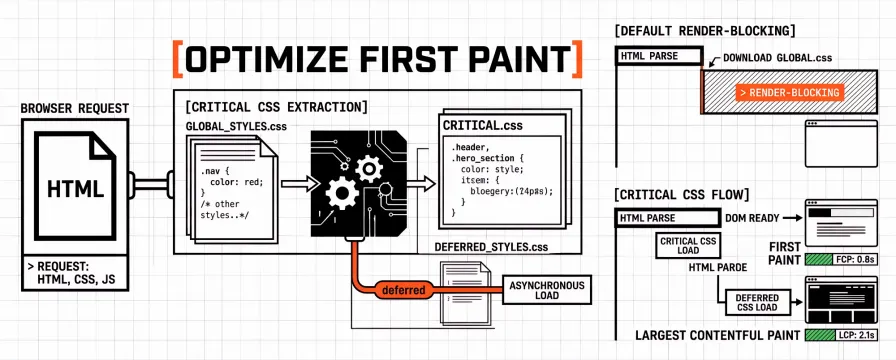
Critical CSS is a narrower job: ship only the styles needed for the first viewport as soon as HTML arrives, then load the remainder without blocking that first paint. The method is measurable. Chrome’s Coverage tab shows what was used on load; guessing from a theme “optimise” toggle is not the same work.
The sections below walk through extraction and deferral for agency sites. For what First Contentful Paint and Total Blocking Time mean in lab reports, keep FCP and TBT: Supporting Metrics Beyond Core Web Vitals open. For Largest Contentful Paint thresholds and fixes, see LCP, INP, CLS: What Each Core Web Vital Means and How to Fix It. Resource hints that pair with deferred CSS are covered in Preload, Prefetch, and Preconnect: Resource Hints for Faster Core Web Vitals. The full browser critical rendering path (DOM, CSSOM, layout, paint) is a separate map; here the focus stays on CSS extraction and render-blocking stylesheets.
What critical CSS is (and what it is not)
Critical CSS is the subset of rules required to render content that is visible in the initial viewport (sometimes called above the fold). Google’s performance guides describe it as styles needed so the browser can paint meaningful content without waiting for every stylesheet on the network. That definition is deliberately smaller than “the CSS file the theme already ships.”
It is not “all CSS for the homepage,” and it is not a substitute for removing unused CSS from the full bundle. It is also not the same as understanding every stage of the critical rendering path. Critical CSS answers a shipping question: which rules must travel with the first HTML response so first paint is not stuck behind a large link rel="stylesheet"?
When the critical set is too large, you pay HTML bytes on every document request, often with a short cache lifetime. When it is too small, users see unstyled or partially styled content until the deferred sheet arrives. The useful size is usually the Coverage-green set for the templates you care about on mobile, plus a margin for the Largest Contentful Paint element’s layout.
How render-blocking CSS delays First Contentful Paint and Largest Contentful Paint
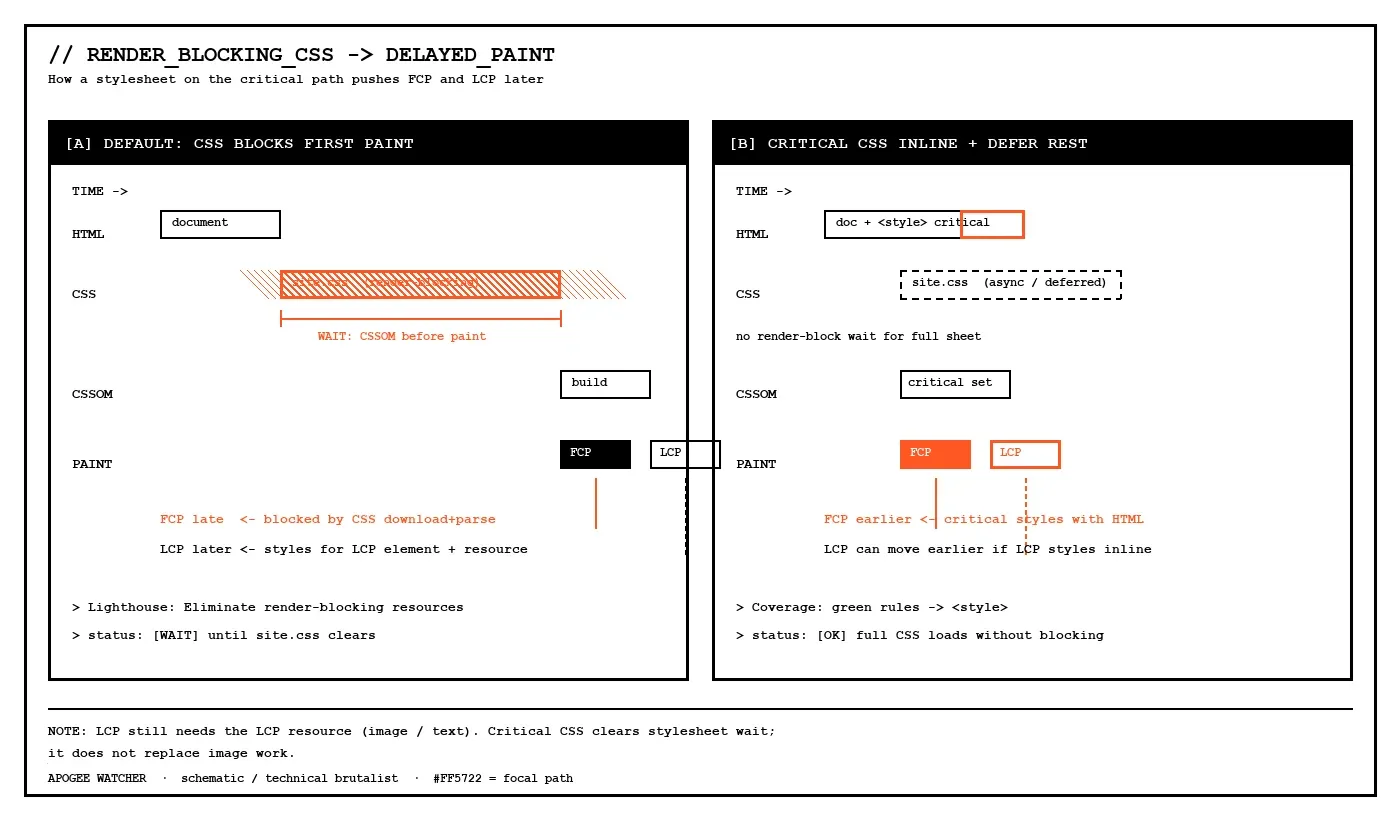
By default, CSS is render-blocking. The browser builds the CSS Object Model before it paints, so it avoids a Flash of Unstyled Content. That behaviour is intentional. The cost appears when a large shared stylesheet must finish downloading and parsing before any text or hero layout appears.
In Lighthouse and PageSpeed Insights, that cost shows up as the Eliminate render-blocking resources opportunity: stylesheet (and script) URLs that sit on the critical path to first paint. First Contentful Paint moves when those bytes clear earlier. Largest Contentful Paint can improve when the LCP element’s styles and related layout rules are available sooner, but LCP still depends on the LCP resource itself (image, text block, or video poster). Fixing render-blocking CSS does not replace image optimisation for a heavy hero.
Scripts marked without async or defer can block parsing as well. Stylesheets are the subject here. Script deferral and Interaction to Next Paint belong on a separate main-thread checklist; not every render-blocking URL in the audit is a CSS problem.
How to find critical CSS with Chrome DevTools Coverage
Extraction works best from evidence, not from a plugin default. Theme toggles that claim to eliminate render-blocking resources rarely show which rules still matter for first paint. A practical Coverage pass looks like this:
Open the page on a representative mobile viewport (or device mode that matches your lab strategy).
Open DevTools → Command Menu → Show Coverage, then reload so the report captures the initial load.
Inspect each stylesheet URL. Green marks rules used for that load; red marks unused rules in that file for that load.
Treat green rules that style above-the-fold content (header, hero, primary text, navigation chrome) as candidates for the critical set. Red rules for below-the-fold accordion bodies, footers, and dormant components usually belong in the deferred sheet.
Coverage is a laboratory sample. A cookie banner that appears after consent, or a mega-menu that opens on hover, may need styles that were red on a cold load. Those rules still belong in the critical set when they affect first paint or first interaction on real client templates. For portfolio work, Coverage on home and on the conversion URL, then a careful merge of the two sets, beats inlining two full themes.
Automated extractors (for example the Critical tooling family referenced in Chrome’s render-blocking docs) can speed the cut when the architecture allows it. The output still needs a Coverage check and a visual pass. Automated critical CSS that omits font-face or hero layout rules is a common FOUC source, and that failure usually shows up on mobile first.
How to inline critical CSS and defer the rest
A common pattern, documented on web.dev, looks like this:
Place the critical rules in a
<style>block in the document<head>(minified).Load the full stylesheet asynchronously so it does not block first paint, for example with
rel="preload"asstyleand anonloadhandler that switches it to a stylesheet, plus a<noscript>fallback for browsers without script.Keep the inlined block small enough that the HTML response stays lean.
<head>
  <style>/* minified critical rules only */</style>
  <link
    rel="preload"
    href="/css/site.css"
    as="style"
    onload="this.onload=null;this.rel='stylesheet'"
  />
  <noscript><link rel="stylesheet" href="/css/site.css" /></noscript>
</head>
Production sites often wrap the preload pattern in a small helper (loadCSS-style) so Content Security Policy and older browsers behave predictably. The principle stays the same either way: critical styles travel with HTML, and the bulk of the CSS arrives without blocking the first paint. The helper exists for edge cases; the measurement still comes from Coverage and a dated lab run.
Deferred CSS pairs well with honest resource hints when the full sheet is still important soon after paint. A preload for the stylesheet is part of that story; preloading every font and hero image at once usually blows the budget. The decision table in the resource-hints guide keeps those choices from competing with each other.
Media-query stylesheets as a lighter alternative
Not every render-blocking sheet needs full critical-CSS extraction. Styles that only apply to print, or only above a large breakpoint, can stay in separate files with a media attribute. The browser still downloads them according to its rules, but it does not block first paint on media that do not match.
<link rel="stylesheet" href="/css/site.css" />
<link rel="stylesheet" href="/css/print.css" media="print" />
<link rel="stylesheet" href="/css/wide.css" media="(min-width: 64em)" />
This approach helps when print or desktop-only rules inflate a shared bundle. It does not replace critical CSS when the default (always-matching) sheet is still huge. Media splits suit conditional CSS; extraction suits the case where the main all stylesheet is the blocker Lighthouse names.
Mistakes that make “critical CSS” slower
Inlining the entire theme. Critical CSS that is “most of app.css” increases HTML weight on every navigation and often cannot be cached as aggressively as a hashed stylesheet. First paint may still improve on a cold cache, but TTFB and transfer size can suffer on repeat views and multi-page sessions.
Guessing without Coverage. Theme or page-builder toggles that claim to eliminate render-blocking resources often defer styles the first paint still needs. The result is FOUC, layout thrash, or a late Cumulative Layout Shift when the full sheet arrives.
Forgetting the Largest Contentful Paint element. If the LCP node is a text block or image whose dimensions depend on deferred rules, a generic render-blocking audit can go green while LCP stays red. LCP styles belong in the critical set, and the LCP resource itself still needs its own optimisation. Agency reports that celebrate a cleared opportunity while LCP stays amber lose credibility fast.
Skipping noscript or CSP-safe loading. Async CSS patterns that rely only on inline onload handlers can fail under strict Content Security Policy. A fallback matters when the client’s security headers are strict. Test the pattern under the same CSP the production site already ships.
Treating one homepage pass as the portfolio. Agency sites share templates. Critical CSS extracted only from a brochure home can miss booking or checkout chrome. Coverage on the conversion URL before you declare the set done catches that gap.
How to verify the change in Lighthouse and monitoring
After critical CSS ships, a useful verification loop looks like this:
Record the laboratory tool, URL, strategy (mobile or desktop), and date for a before baseline.
Re-run Lighthouse or PageSpeed Insights on the same URL and strategy. Check Eliminate render-blocking resources, First Contentful Paint, and Largest Contentful Paint together.
Visually confirm first paint on a throttled mobile profile: no long unstyled flash, hero and header readable early.
Watch Cumulative Layout Shift if late styles change dimensions after paint.
Put a follow-up lab run on the calendar, and on other templates that share the CSS pipeline.
A single green opportunity row is not a portfolio proof. Scheduled lab tests catch the next theme update that reintroduces a blocking sheet. Budgets on FCP or LCP make that regression visible without waiting for a client complaint.
FAQ
Is critical CSS the same as eliminating unused CSS?
No. Unused CSS removal shrinks the full stylesheet. Critical CSS chooses which rules travel with the first HTML response. Teams usually need both over a quarter: unused CSS for transfer size, critical CSS for first paint timing.
Will critical CSS always improve Largest Contentful Paint?
Not always. It helps when LCP is waiting on stylesheet work. If LCP is a large image or a slow server, those paths still need work. Reading FCP and LCP together after the change shows which lever moved.
Can we defer all CSS to the bottom of the body?
Moving the link lower can change priority, but the browser may still treat the stylesheet as high priority and you risk FOUC. An explicit critical set plus async load of the remainder, with a noscript fallback, is the more reliable pattern. Position alone rarely matches what Coverage would have selected for above-the-fold paint.
Do WordPress or Shopify “defer CSS” plugins replace Coverage?
They can automate a pattern, but they still need verification. Coverage plus a dated lab test on home and the conversion URL after enabling a plugin, with a rollback ready if FOUC appears, is the safer agency habit. Plugin defaults rarely know your booking or checkout chrome.
How does this relate to the critical rendering path?
Render-blocking CSS is one stage of the path from HTML to pixels. Extraction and deferral are the shipping half of that story. A deeper pass on DOM, CSSOM, layout, and paint belongs in a critical rendering path guide; web.dev’s Critical Rendering Path is the map when you need those stages named in order.
Measure first, then inline
Critical CSS works when the critical set is measured, small, and verified. Coverage decides what is above the fold; the inline block carries that set; an async pattern loads the rest. First Contentful Paint and Largest Contentful Paint on the same client URLs show whether the change stuck, and a follow-up lab run after the next theme update shows whether it stayed stuck.
If those lab checks need to run on a schedule across many domains, try Apogee Watcher or run a free domain check before and after the CSS change.
References
Eliminate render-blocking resources (Chrome for Developers)
Extract critical CSS (web.dev)
Defer non-critical CSS (web.dev)
Render-blocking CSS (web.dev)
Critical Rendering Path (web.dev)
Optimize resource loading (web.dev)
LCP, INP, CLS: What Each Core Web Vital Means and How to Fix It
Preload, Prefetch, and Preconnect: Resource Hints for Faster Core Web Vitals