Agencies already know how to read a single PageSpeed Insights run. The harder job is turning twenty URLs on one host into a fix order a developer can ship without reopening every Lighthouse tab. Domain report Summary gave us a deterministic triage layer earlier this year: attention-free score, top pages, and merged opportunities. What was still missing was an optional synthesis step that names shared problems and ranks what to change first across the property.
That step is out of beta. AI actionable insights now generate from a domain-report snapshot in Apogee Watcher: one site-level evaluation grounded in stored PageSpeed / Lighthouse evidence, not a one-off chat about a single homepage run. We also refreshed the site view so tests, pages, discovery, and reports stay in one workspace when you prepare that snapshot.
What site-level AI insights do with PageSpeed evidence
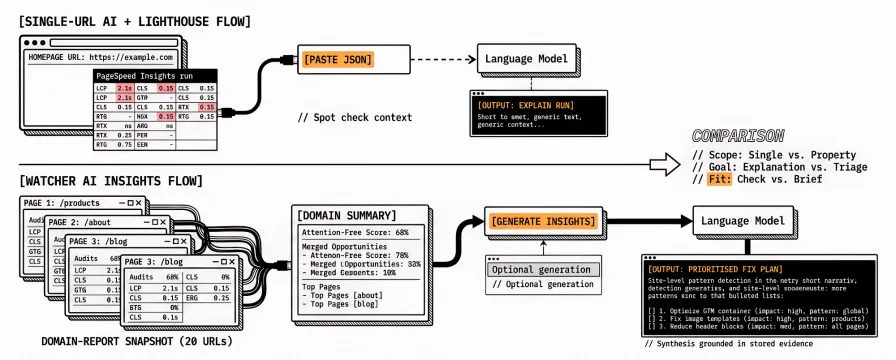
AI insights answer a different question from a single-URL Lighthouse chat. Tools that paste one PageSpeed Insights JSON into a language model explain that URL. Watcher starts from a domain report: up to about twenty pages already tested on mobile and desktop, with scores and opportunities already grouped. The model sees a bounded summary of site problems built from that snapshot. It returns a short narrative, a prioritised how-to-fix list, and evidence that points at shared templates, third parties, or headers when those patterns repeat.
Lighthouse remains the source of truth for scores and audits. The insight does not re-score the site or invent metrics that were not in the stored runs. It synthesises what the deterministic report already shows, so an account lead can hand a developer an ordered checklist instead of a screenshot dump. That site-level default is deliberate: calling a model on every completed page test would use quota quickly and mostly rewrite audit text you already have.
| Approach | Input | Typical output | Fit |
|---|---|---|---|
| Single-URL AI + Lighthouse | One page, one strategy | Explain this run | Spot check or homepage deep dive |
| Watcher AI insights | Domain-report snapshot (multi-page) | Prioritised site fix plan | Agency portfolio triage after scheduled tests |
If you only need “what is red on this URL right now,” PageSpeed Insights or the Mobile / Desktop tabs on the domain report are enough. AI insights fit when the brief is “what should we change across this property first?” The distinction matters in client emails: one explains a spot check, the other briefs a template or third-party change that shows up across many URLs. Agencies usually need both over a quarter; they just should not confuse them on the same call.
How AI insights sit next to the domain report Summary
Attention-Free Score: How Domain Reports Show Which Pages Need Work remains the always-on layer. Summary is free with the report: attention-free percentage, dimensions needing attention, top pages, and merged opportunities. No language-model credit is spent to open it.
AI insights are the optional layer on the same snapshot. Generate when you want natural-language prioritisation and a fix checklist grounded in recurring audits. Skip generate when Summary already answers the client call. Public share links show the insight body only after someone with access has generated a completed insight; visitors never see an empty AI box or a Generate button on the public URL.
That split keeps lab triage honest. Deterministic Summary is the scoreboard. AI is the briefing note you write when the portfolio needs a narrative, not a replacement for budgets, alerts, or scheduled monitoring. For the broader monitoring loop, see What Is Automated Web Performance Monitoring? and PageSpeed Insights vs Automated Monitoring.
Where to generate AI insights in Watcher
Generation starts from evidence that already exists. After scheduled or manual tests finish, a Manager or Admin creates a domain report from the site Reports tab. In the app, the report’s AI insights tab shows either an empty state with Generate AI insights, or the stored insight with Regenerate and Copy markdown. The same generate action is available from the site Reports list.
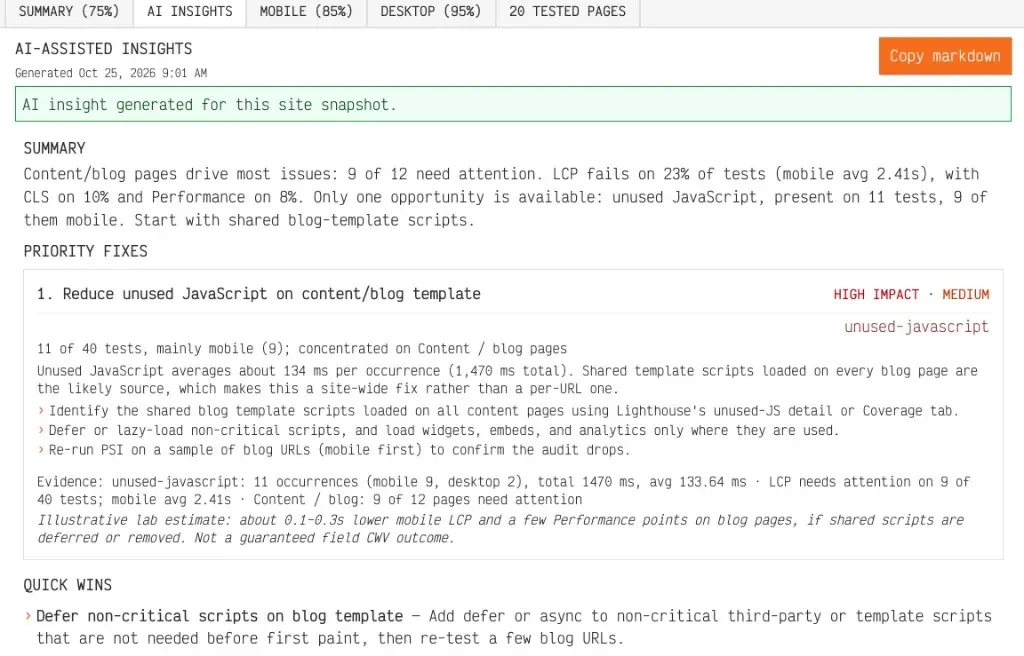
Live example: apogeewatcher.com domain report AI insights — site-level summary, priority fixes, and quick wins on the public share URL.
Each generate or regenerate uses one AI credit for the organisation’s current monthly period. Caps and remaining usage appear in the topbar Plan & usage panel next to sites, organisations, and tests. Step-by-step detail is in Domain performance reports and Understand plan limits.
On the public domain report URL, recipients see the insight only when a completed one exists. That keeps prospect and client links tidy: you decide when synthesis is ready to share, then send the same token you already use for Summary. Until you generate, the public page stays a clean lab readout without an empty AI placeholder.
AI insights quota and which plans include them
Default paid tiers from Personal upward include AI insights. Free does not. Pricing and My Account show whether the feature is on before you promise synthesis in a retainer scope. Monthly AI credit limits sit beside test volume on purpose: synthesis is meant for site evaluations, not one model call per scheduled page run.
When the meter is empty, Generate and Regenerate stay blocked until the period resets or the plan changes. Site-level evaluation is the default we ship; per-run AI deep dives remain a future path if customers ask for them. Portfolio roll-ups across many client sites are also later work. For weekly organisation PDFs and white-label branding already live, see Weekly Organisation Reports and White-Label Branding Options Are Live.
Updated site view: tests, pages, discovery, and reports together
Alongside AI insights leaving beta, we refreshed the site view in the app so day-to-day monitoring work does not scatter across unrelated screens. From Setup → Sites, a property opens as one record: pages and discovery for the URL pool, test history for what already ran, statistics for recent lab movement, and Reports for domain-report generation and AI actions. Fewer switches between “find URLs,” “see what ran,” and “share what it means” means fewer stale snapshots.
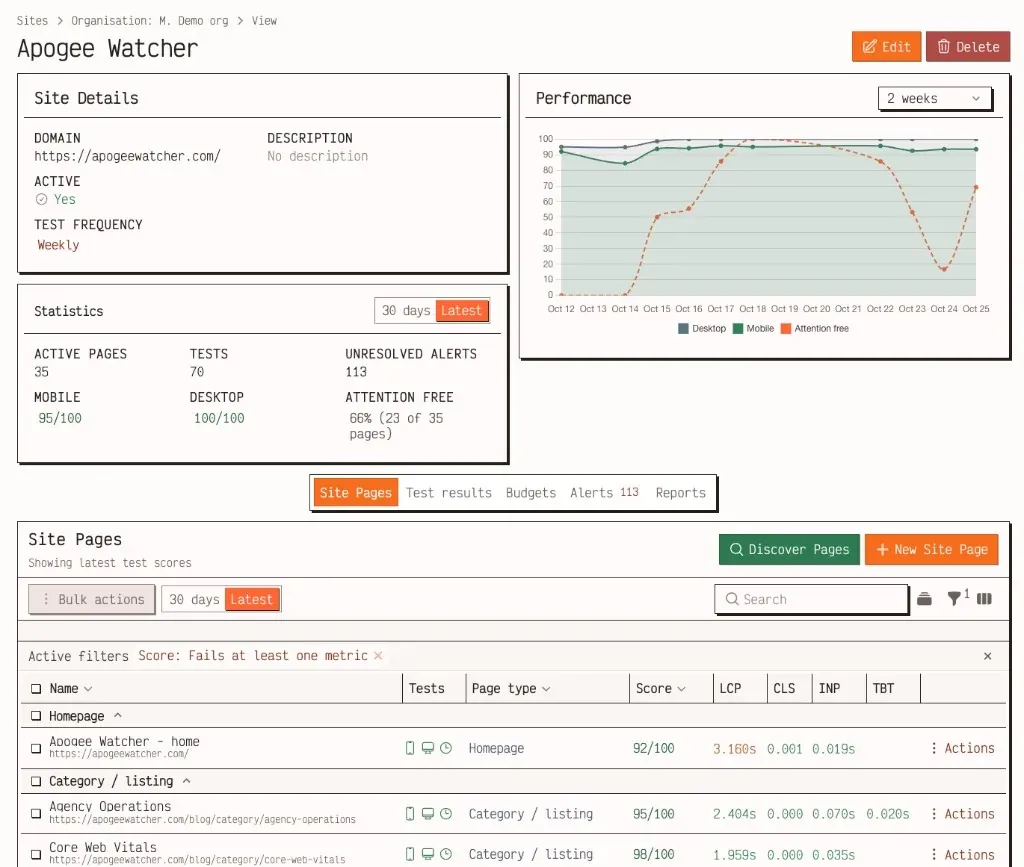
Insights are only as good as the evidence behind them. Discovery and page lists decide which URLs enter the report pool. Scheduled tests fill that pool. Reports turn the results into a shareable Summary and, when you choose, an AI briefing. Keeping those steps on one site record lowers the chance that someone generates synthesis from an incomplete page set.
Client-ready reporting habits still apply: budgets and schedules first, then shared links. Client-Ready Core Web Vitals Report Outline remains useful when Summary plus an insight becomes a retainer narrative. The insight works as the ordered checklist inside that outline, not as a substitute for the scoreboard.
What AI insights do not claim
We are explicit about scope so contracts stay clean:
Insights do not replace Lighthouse scores, audit lists, or Attention-Free gates.
Insights do not guarantee rankings, Core Web Vitals field improvements, or pass/fail after a deploy. You still re-test and compare stored runs.
Insights are not generated on every completed PageSpeed run by default.
Public visitors cannot spend your AI credits.
Free plans cannot generate insights.
The useful promise is narrower: faster time from multi-page red metrics to a concrete, evidence-backed checklist your team can implement and then verify with scheduled lab tests.
FAQ
Do I need AI insights to use domain reports?
No. Summary, Mobile, Desktop, and Tested pages work without generating an insight. AI is optional synthesis on Personal and higher plans that include the feature.
Can clients generate insights from a public share link?
No. The public URL shows a completed insight when one exists. Generate and Regenerate stay in the signed-in app for roles that can manage reports, so visitors cannot spend your monthly AI credits.
Is this the same as pasting PageSpeed Insights into ChatGPT?
No. Watcher builds a bounded site summary from a multi-page domain-report snapshot already stored for your organisation. Single-URL chat tools explain one run; they do not see your scheduled portfolio context or recurring audits across templates.
Will AI insights appear on weekly organisation PDFs?
Not in this release. Organisation weekly reports and white-label PDFs remain the portfolio pack described in the September ship note. Domain-report AI is site-level synthesis on the HTML report path first.
What should I do after I apply a recommended fix?
Re-run tests on the affected pages, regenerate the domain report when you want a fresh snapshot, and compare Attention-Free and opportunity lists. Treat the insight as guidance before the fix, not as a certificate after deploy. Pass or fail still comes from the next stored lab runs, the same way budgets and alerts already work.
If you want site-level guidance on top of the monitoring loop you already run, open a site with completed tests, generate a domain report, then use Generate AI insights when the plan includes the feature. A trial starts at sign-up; a free domain check shows Summary without AI first. Changelog #14 at the end of October will cover the wider product window.
References
Domain performance reports (Apogee Watcher docs)
Understand plan limits (Apogee Watcher docs)
Plan features by tier (Apogee Watcher docs)
Attention-Free Score: How Domain Reports Show Which Pages Need Work
PageSpeed Insights vs Automated Monitoring: When Manual Checks Aren't Enough
Weekly Organisation Reports and White-Label Branding Options Are Live
PageSpeed Insights API (Google for Developers)
Lighthouse in Chrome DevTools (Chrome for Developers)