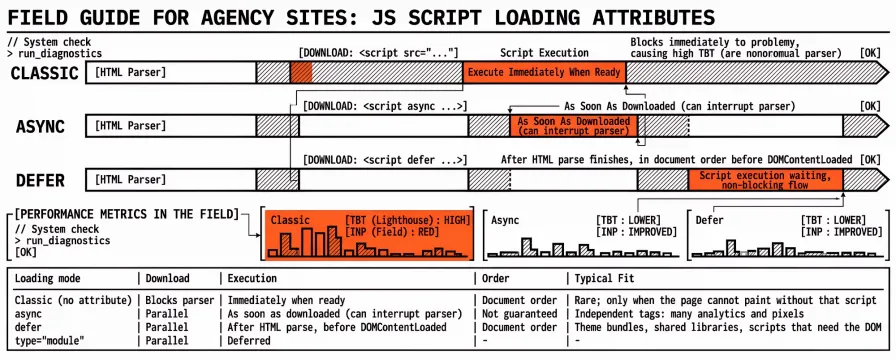
A classic <script src="…"> with no attributes pauses HTML parsing while the file downloads and runs. An async script downloads in the background and runs as soon as it is ready, which can interrupt the parser mid-document. A defer script also downloads in the background, but it waits until parsing finishes, then runs in document order before DOMContentLoaded.
Those three timings are not interchangeable. Choosing wrong keeps Total Blocking Time high in the lab and Interaction to Next Paint red in the field, even after you have cleaned render-blocking CSS. Script loading is the other half of first-paint and responsiveness work. Critical CSS clears stylesheet wait; attributes on <script> decide when JavaScript claims the main thread.
What follows is a field guide for agency sites: how parser-blocking scripts feed TBT and INP, when defer versus async fits, what type="module" changes, and how to verify the change on the URLs you already monitor. Metric thresholds sit in LCP, INP, CLS: What Each Core Web Vital Means and How to Fix It and FCP and TBT: Supporting Metrics Beyond Core Web Vitals. Third-party inventories belong with Third-Party Scripts and Performance: The Worst Offenders. Stylesheet extraction is covered in Critical CSS and Render-Blocking Resources: Faster First Paint Without Guessing.
What parser-blocking scripts do to Total Blocking Time and INP
Without async, defer, or type="module", an external classic script is parser-blocking. The browser stops building the DOM until that script has downloaded, parsed, and executed. Long tasks on the main thread after First Contentful Paint add to Total Blocking Time in Lighthouse: every task over 50 milliseconds contributes its duration minus 50 milliseconds to the TBT sum. High TBT is a lab signal that the page was hard to interact with during load.
Interaction to Next Paint is the field Core Web Vital for responsiveness. It measures how long the page takes to respond to clicks, taps, and key presses with the next paint. Heavy JavaScript during or soon after load is a common INP cause, but INP also captures later interactions when chat widgets, consent banners, or cart scripts wake up. TBT is a useful lab proxy for that risk; it is not a substitute for field INP. web.dev is explicit that a low TBT often correlates with a low INP, and that you still need field measurement for real user responsiveness.
For agencies, the practical split is simple. Lighthouse TBT and the Performance panel show which script files create long tasks on a cold load. CrUX in PageSpeed Insights or Search Console shows INP on the live origin. Changing script attributes moves both numbers only when those scripts were actually on the critical path.
Defer vs async scripts: when each attribute fits
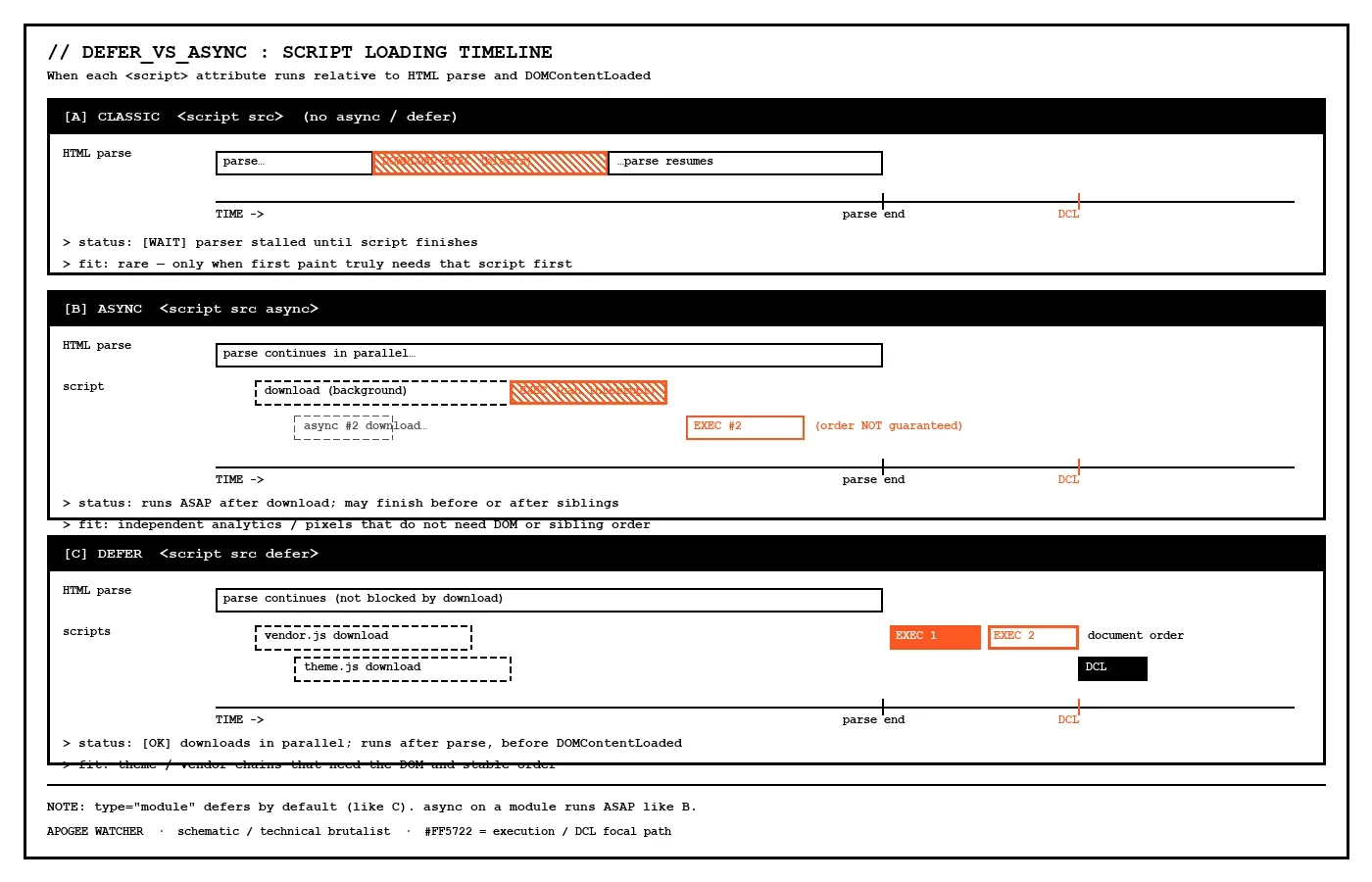
Both async and defer let the browser continue parsing HTML while the script downloads. The difference is when execution starts, and whether order is preserved. MDN and web.dev describe the same contract:
| Loading mode | Download | Execution | Order | Typical fit |
|---|---|---|---|---|
| Classic (no attribute) | Blocks parser | Immediately when ready | Document order | Rare; only when the page cannot paint without that script |
async | Parallel | As soon as downloaded (can interrupt parser) | Not guaranteed | Independent tags: many analytics and pixels |
defer | Parallel | After HTML parse, before DOMContentLoaded | Document order | Theme bundles, shared libraries, scripts that need the DOM |
type="module" | Parallel | Deferred by default (like defer) | Module graph order | Modern app entry points and ES modules |
<!-- Independent; order does not matter -->
<script src="https://example.com/analytics.js" async></script>

<!-- Needs DOM; must run after sibling libraries in order -->
<script src="/js/vendor.js" defer></script>
<script src="/js/theme.js" defer></script>
async fits when the script is self-contained and should run at the first opportunity after download. Analytics snippets often ship this way. Evaluation can still briefly block the parser when it starts, and two async tags may finish in either order.
defer fits when scripts depend on the full document or on each other. Theme JavaScript that handles forms, drawers, and navigation usually belongs here. defer scripts run in markup order after parsing completes, which keeps vendor-then-app sequences intact. Shopify’s theme guidance makes the same split: defer for theme scripts, async for independent third parties.
If both async and defer are present on a classic script, browsers treat the element as async. One deliberate attribute is clearer than both. Leaving both set usually means a copy-paste leftover, not a loading strategy.
How type="module" changes script loading
Module scripts (<script type="module" src="…">) are deferred by default. You do not need a separate defer attribute for that behaviour; MDN notes that defer has no effect on modules because deferral is already the default. Modules also fetch their dependency graph, so boot cost can still create long tasks even when parsing is not blocked.
Adding async to a module script changes the contract: the module and its dependencies fetch in parallel with parsing and evaluate as soon as they are available, without waiting for the full document parse the way classic defer does. That helps some independent module entry points. It is a poor default for a theme that expects DOM-ready order across several classic files.
For agency migrations, modules and classic tag-manager injects are usually separate pipelines. Converting one app bundle to type="module" does not fix a synchronous Google Tag Manager container still in the <head> without async or defer. Both pipelines need a check on the same URL before the JavaScript half is done.
How to choose attributes for theme, analytics, and tag-manager scripts
A practical decision pass on a client template looks like this:
List every external
<script src>on home and on the conversion URL (view-source or the Network panel filtered to JS).Mark each script as theme / first-party app, analytics or pixel, tag manager / consent, or embed (chat, maps, video).
deferusually fits first-party theme and app scripts that touch the DOM or depend on load order.asyncusually fits independent third-party trackers that do not require sibling order.Classic blocking is rarely justified; it belongs only when a script must run before first paint for a documented reason.
Tag managers should match the vendor’s current snippet. Many Google Tag Manager installs use
asyncon the container loader; consent-mode and consent-banner scripts still need a check so they do not reintroduce a parser-blocking chain.Coverage and the Performance panel confirm the change: long tasks should move off the early critical path, not merely rename themselves.
Third-party volume still matters after attributes are correct. A deferred chat widget that downloads two megabytes will hurt INP when it evaluates, even if it no longer blocks HTML parsing. Attribute choice is necessary; removing or delaying low-value tags remains the larger win on many portfolios. The worst-offenders guide covers that inventory work.
Mistakes that keep Total Blocking Time and INP high
Deferring nothing and hoping minify alone is enough. Minification shrinks transfer size. It does not change parser-blocking behaviour. A small synchronous script in the <head> can still stall DOM construction on a mid-range mobile CPU.
Putting interdependent libraries on async. If theme.js assumes vendor.js already ran, async on both creates race conditions that look like “flaky checkout” rather than a Lighthouse warning. Those scripts usually need defer (or a single bundled file) so order stays stable. The attribute change is cheaper than a sprint chasing intermittent null-reference bugs.
Treating async as “free.” Evaluation still runs on the main thread. An analytics file that executes a 200 millisecond task as soon as it downloads still adds blocking time. Attributes work better alongside code-splitting, fewer tags, and idle or interaction-based loading where the product allows it.
Ignoring dynamically injected scripts. Tag managers and consent tools often insert new <script> nodes at runtime. Attributes on the original loader do not automatically apply to every child inject. The Network and Performance panels after consent accept show more than a cold load with banners dismissed.
Fixing CSS and skipping JavaScript. Clearing render-blocking stylesheets improves First Contentful Paint and sometimes Largest Contentful Paint. Responsiveness still depends on when scripts run. The CSS pass and the script-attribute pass belong on the same URLs as related work items.
One homepage change for the whole portfolio. Booking, checkout, and account templates often load extra tags. Coverage and TBT on the conversion URL catch scripts the brochure home never requested. Checkout and booking templates need their own script inventory, not a copy of the home <head>.
How to verify script-loading changes in Lighthouse and monitoring
After attributes change, a useful verification loop looks like this:
Record the laboratory tool, URL, strategy (mobile or desktop), and date for a before baseline.
Re-run Lighthouse or PageSpeed Insights on the same URL and strategy. Total Blocking Time, the “Reduce JavaScript execution time” / bootup-time related audits, and any remaining render-blocking or unused-JavaScript opportunities belong in the same read.
In Chrome DevTools Performance, long tasks after FCP should shrink or move later; the Main track names the script URLs.
Interaction to Next Paint in the field section of PageSpeed Insights or Search Console, after enough traffic, is the check lab TBT cannot replace.
Critical journeys (add to cart, open booking form, accept cookies) confirm
defer/asyncdid not break order-dependent behaviour.A follow-up lab run on other templates that share the same tag container catches container-wide regressions.
A green TBT row on one homepage is not a portfolio proof. Theme updates and marketing tag changes reintroduce synchronous injects. Budgets on TBT or field INP make that regression visible without waiting for a client complaint.
FAQ
Is defer always better than async?
No. defer preserves order and waits for HTML parse, which suits theme and library chains. async suits independent scripts that should run at the first opportunity after download. The wrong choice for the dependency graph is worse than either attribute used correctly.
Will changing script attributes always improve Interaction to Next Paint?
Not always. Attributes help when parser-blocking or early evaluation was creating long tasks around interaction. If INP is driven by a heavy click handler or a late third-party widget, that work still needs reducing. Lab TBT and field INP together after the change show which lever moved.
Do async and defer work on inline scripts?
For classic scripts, both attributes require a src. Inline classic scripts ignore them. Module scripts can be inline with type="module" and still follow module loading rules.
Should Google Tag Manager use defer or async?
The current Google snippet for your install is the source of truth. Many container loaders use async. After install, child tags and consent scripts in the Performance panel matter, because the container is only the first file in the chain.
How is this different from critical CSS work?
Critical CSS decides which styles travel with the first HTML response. Script attributes decide when JavaScript runs relative to parsing. Most agency sites need both: stylesheets for first paint, scripts for responsiveness. The critical CSS guide covers the stylesheet half; this guide covers the script half.
Measure the main thread, then pick the attribute
Defer versus async is a timing decision, not a slogan. Classic blocking scripts stall the parser; async races independent tags; defer keeps ordered theme work after parse; modules defer by default. Total Blocking Time shows whether load still floods the main thread in the lab, and Interaction to Next Paint shows whether real users feel that cost.
If those lab and field checks need to run on a schedule across many domains, try Apogee Watcher or run a free domain check before and after the script-attribute change.
References
Efficiently load third-party JavaScript (web.dev)
Optimize resource loading (web.dev)
Total Blocking Time (TBT) (web.dev)
Total Blocking Time (Chrome for Developers / Lighthouse)
LCP, INP, CLS: What Each Core Web Vital Means and How to Fix It
Critical CSS and Render-Blocking Resources: Faster First Paint Without Guessing