The Problem: No Clear Definition of "Good"
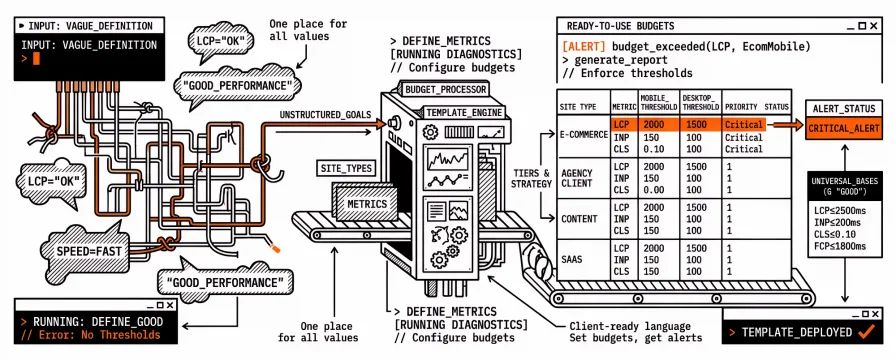
Without concrete thresholds, you can't set performance budgets, explain pass/fail to clients, or know when to alert. "LCP should be good" isn't enough — you need numbers. This template gives you those numbers: ready-to-use thresholds by site type (e-commerce, agency client sites, content, SaaS, landing pages) so you can define "good" once and enforce it everywhere.
Benefits: One place for all your budget values, client-ready language, and clear escalation (warning vs critical). What you get: Set budgets per site, get alerted only when it matters, and report to clients with confidence.
Your Ready-to-Use Performance Budget Template
Copy the thresholds below into a Google Sheet, CSV, or your monitoring tool. No theory — just the numbers, organised by site type and strategy.
If you want the "why" behind these numbers, read our Complete Guide to Performance Budgets first.
The Template
Universal Thresholds (Google's "Good" Baselines)
These are the starting points for any site. For an introduction to what is Core Web Vitals, see our practical guide; the numbers below follow Google's documented thresholds. Adjust based on your baseline: If your current scores are far from these targets, use them as stretch goals and set interim budgets at your current values. Tighten as you improve.
Note: For LCP, INP, FCP, TBT, Speed Index — lower is better. "Poor" = exceed the max. For Performance Score and CLS — higher is better (Score) / lower is better (CLS).
Metric | Good | Needs Improvement | Poor | Unit |
|---|---|---|---|---|
LCP | ≤2500 | 2500–4000 | >4000 | milliseconds |
INP | ≤200 | 200–500 | >500 | milliseconds |
CLS | ≤0.10 | 0.10–0.25 | >0.25 | score |
FCP | ≤1800 | 1800–3000 | >3000 | milliseconds |
TBT | ≤200 | 200–600 | >600 | milliseconds |
Speed Index | ≤3400 | 3400–5800 | >5800 | milliseconds |
Performance Score | ≥90 | 50–89 | ≤49 | points (0–100) |
Budget Template by Site Type
E-Commerce
Metric | Mobile Budget | Desktop Budget | Priority | Notes |
|---|---|---|---|---|
LCP | 2000 | 1500 | Critical | Product images are usually LCP — optimise aggressively |
INP | 150 | 100 | Critical | Cart, filters, search must feel instant |
CLS | 0.05 | 0.05 | Critical | Strict — shifts cause misclicks and lost revenue |
FCP | 1500 | 1200 | High | First paint signals page is loading |
TBT | 150 | 100 | High | Heavy JS frameworks common in e-commerce |
Speed Index | 3000 | 2500 | Medium | Visual completeness — product grid rendering |
Performance Score | 90 | 95 | High | Conversion-critical pages should target 95+ |
Agency Client Sites (Default)
Metric | Mobile Budget | Desktop Budget | Priority | Notes |
|---|---|---|---|---|
LCP | 2500 | 2000 | Critical | Standard threshold; tighten after initial optimisation |
INP | 200 | 150 | High | Most client sites are content-heavy, not interaction-heavy |
CLS | 0.10 | 0.10 | Critical | Watch for ad slots, lazy images, font loading |
FCP | 1800 | 1500 | High | Important for perceived speed |
TBT | 200 | 150 | Medium | Matters most for interactive pages |
Speed Index | 3400 | 2800 | Medium | Good general indicator |
Performance Score | 90 | 90 | High | Client-facing threshold — below 90 needs attention |
Content / Blog Sites
Metric | Mobile Budget | Desktop Budget | Priority | Notes |
|---|---|---|---|---|
LCP | 2500 | 2000 | Critical | Hero images and article bodies are typical LCP elements |
INP | 200 | 200 | Medium | Less interactive — standard threshold is fine |
CLS | 0.10 | 0.10 | High | Ads and lazy-loaded images are the main risks |
FCP | 1800 | 1500 | High | Fast first paint keeps readers engaged |
TBT | 200 | 200 | Low | Minimal JS on most content pages |
Speed Index | 3400 | 3000 | Medium | Article rendering speed |
Performance Score | 90 | 90 | High | SEO-critical — content sites live or die by search |
SaaS / Web Applications
Metric | Mobile Budget | Desktop Budget | Priority | Notes |
|---|---|---|---|---|
LCP | 2500 | 2000 | High | Dashboard load time — users expect app-level speed |
INP | 100 | 75 | Critical | App interactions must feel native — strict budget |
CLS | 0.05 | 0.05 | Critical | Dynamic content loading needs careful layout reservation |
FCP | 1500 | 1200 | High | Fast initial paint reduces perceived wait |
TBT | 150 | 100 | Critical | Heavy JS is expected but must be managed |
Speed Index | 3000 | 2500 | Medium | Complex UIs load incrementally |
Performance Score | 85 | 90 | High | SaaS apps score lower due to JS — 85 is realistic on mobile |
Landing Pages / Marketing Sites
Metric | Mobile Budget | Desktop Budget | Priority | Notes |
|---|---|---|---|---|
LCP | 2000 | 1500 | Critical | First impression pages — speed is everything |
INP | 150 | 100 | Medium | Limited interactivity but CTAs must be responsive |
CLS | 0.05 | 0.05 | Critical | Zero tolerance — every shift is a potential lost conversion |
FCP | 1200 | 1000 | Critical | Sub-second FCP is the goal for landing pages |
TBT | 100 | 50 | High | Minimal JS — these pages should be fast |
Speed Index | 2500 | 2000 | High | Visual completeness drives conversion confidence |
Performance Score | 95 | 98 | Critical | Landing pages should be near-perfect |
How to Use This Template
Step 1: Choose Your Site Type
Pick the template that matches your site (or start with the "Agency Client Sites" default if you're not sure).
Step 2: Copy Into Your Tool
Google Sheets / CSV:Copy the CSV data above into a spreadsheet. Add columns for:
Current Mobile Score— Your latest test resultCurrent Desktop Score— Your latest test resultStatus— Within Budget / Over Budget / Critical
Monitoring tool (like Apogee Watcher):Enter the Mobile Budget and Desktop Budget values as your performance budget thresholds per site.
Lighthouse CI config:Translate thresholds into your lighthouserc.json:
{
  "ci": {
    "assert": {
      "assertions": {
        "largest-contentful-paint": ["error", {"maxNumericValue": 2500}],
        "cumulative-layout-shift": ["error", {"maxNumericValue": 0.1}],
        "total-blocking-time": ["error", {"maxNumericValue": 200}],
        "first-contentful-paint": ["warn", {"maxNumericValue": 1800}],
        "categories:performance": ["error", {"minScore": 0.9}]
      }
    }
  }
}
Step 3: Baseline Your Sites
Run PageSpeed Insights on your key pages. Fill in the "Current" columns. Anything marked "Over Budget" is an immediate action item.
Step 4: Set Up Alerts
Configure your monitoring tool to alert you when any metric exceeds its budget. Without alerts, this template is just a document. With alerts, it's a safety net.
Multi-Client Tracking Spreadsheet
For agencies managing multiple clients, use this structure:
Client | Domain | Page | Strategy | LCP Budget | LCP Actual | LCP Status | INP Budget | INP Actual | INP Status | CLS Budget | CLS Actual | CLS Status | Score Budget | Score Actual | Score Status | Last Tested |
|---|---|---|---|---|---|---|---|---|---|---|---|---|---|---|---|---|
Acme Corp | acme.com | Homepage | Mobile | 2500 | 2100 | OK | 200 | 180 | OK | 0.10 | 0.05 | OK | 90 | 92 | OK | 2026-02-10 |
Acme Corp | acme.com | Homepage | Desktop | 2000 | 1400 | OK | 150 | 95 | OK | 0.10 | 0.02 | OK | 90 | 96 | OK | 2026-02-10 |
Acme Corp | acme.com | Pricing | Mobile | 2500 | 3200 | OVER | 200 | 220 | OVER | 0.10 | 0.15 | OVER | 90 | 71 | OVER | 2026-02-10 |
Widget Co | widgets.io | Homepage | Mobile | 2500 | 1900 | OK | 200 | 160 | OK | 0.10 | 0.08 | OK | 90 | 94 | OK | 2026-02-10 |
Widget Co | widgets.io | Shop | Mobile | 2000 | 2800 | OVER | 150 | 190 | OVER | 0.05 | 0.12 | OVER | 90 | 67 | OVER | 2026-02-10 |
Color-code the Status column: green for OK, red for OVER. Review weekly.
Budget Escalation Levels
Not all budget violations are equal. Use escalation levels to prioritise response:
Level | Condition | Response | SLA |
|---|---|---|---|
Info | Metric within 10% of budget | Note for next review | Next monthly review |
Warning | Metric exceeds budget by < 20% | Investigate cause | Within 1 week |
Critical | Metric exceeds budget by > 20% | Immediate investigation | Within 48 hours |
Emergency | Score drops below 50 or LCP > 5s | Treat as incident | Within 4 hours |
Adjusting Budgets Over Time
Budgets aren't permanent. Review quarterly:
Tighten when:
Your team consistently meets budgets with room to spare
Competitors are faster and you're losing rankings
Client expectations increase
Loosen when:
New required functionality legitimately impacts performance (e.g., adding a complex interactive feature)
A temporary campaign requires heavier scripts (set an expiration date for the loosened budget)
Never loosen because:
"We can't fix it right now" — that's a prioritisation issue, not a budget issue
"The score fluctuates" — that's normal variance, not a reason to move the goalposts
Get this template on GitHub
Copy-ready CSV budgets by site type, a multi-client tracking sheet, and a Lighthouse CI example live in performance-budget-thresholds-template (CC0).
Browse the full set in core-web-vitals-checklists · Apogee on GitHub.
FAQ
Can I customise these thresholds for my specific site?Yes. The template provides baseline values. Adjust based on your current scores, site type, and competitive benchmarks. E-commerce and landing pages often need stricter LCP and CLS budgets; content sites can use the standard thresholds.
What's the difference between the "Agency Client Sites" and "E-Commerce" templates?Agency Client Sites use Google's standard "Good" thresholds as a default. E-Commerce is stricter — lower LCP (2s vs 2.5s), tighter INP (150ms vs 200ms), and stricter CLS (0.05 vs 0.1) because conversion-critical pages need to feel instant.
How do I use this template with a monitoring tool?Copy the budget values into your tool's configuration. Most tools let you set thresholds per metric, per site, and per strategy (mobile/desktop). Once set, the tool will run tests against these budgets and alert you when thresholds are exceeded.
Should I track all metrics or just LCP, INP, and CLS?LCP, INP, and CLS are the Core Web Vitals — track them first. FCP, TBT, and Speed Index add useful context. Performance Score is a useful composite. Start with CWV + Score; add others if you need deeper visibility.
What you can achieve: Every site can have clear pass/fail thresholds, alerts that fire only when metrics cross the line, and reports clients understand. Use this template so performance budgets stop being guesswork and start being something you can set, enforce, and show.
Managing performance budgets across multiple sites is easier with automation. Apogee Watcher lets you set budgets per site, get alerted when thresholds are exceeded, and track trends over time. Join the waitlist for early access.