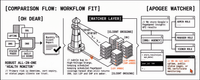
Agencies sell monthly performance retainers every week. Too many of those months still end the same way: a last-minute PageSpeed Insights run, a folder of screenshots, and a PDF that still shows someone else’s brand chrome. Clients pay for monitoring, yet what they receive is a scramble that is hard to renew and harder to upsell.
White-label Core Web Vitals reports only work when the evidence spine is already in place. Scheduled PageSpeed Insights runs collect the history; performance budgets decide what is green or red; a short narrative turns that into action; a branded PDF or share link packages it under your agency name. The retainer conversation then rests on dates, URLs, and agreed thresholds, not on whoever had time to click “Analyse” the night before the call.
What follows is that operating cadence end to end: how a monthly performance report retainer moves from scheduled tests to a client-ready report without rebuilding the deck every time. The failure modes come first, then five stages from schedule to upsell. For the broader case for branded reports, see White-Label Performance Reports; the sections below assume you already want the report and need the workflow.
Why the monthly CWV report usually fails
Most agencies already “report on performance.” That month of reporting still fails for the same reasons:
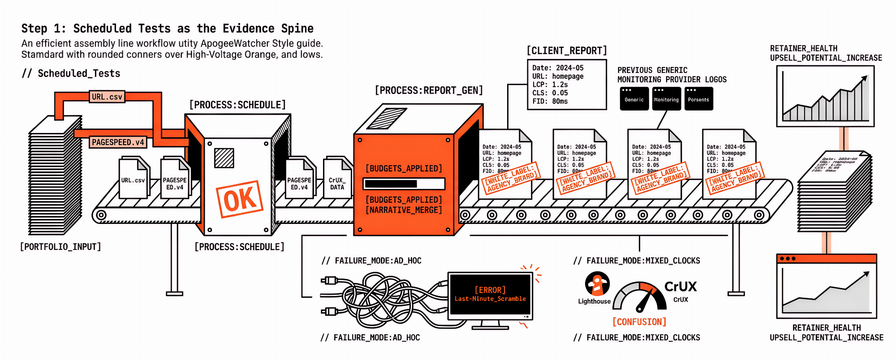
Evidence is ad hoc. Someone runs PageSpeed Insights once, pastes screenshots, and hopes the numbers still match next week.
Lab and field clocks mix. A Lighthouse score and a CrUX window get treated as the same story, so the client gets conflicting answers.
There is no shared budget language. Without thresholds the team agreed in advance, every red number becomes a debate about taste.
Branding is last-minute. The PDF still shows a monitoring vendor’s chrome, or the deck is rebuilt in Canva the night before the call.
The retainer is vague. The client pays for “monitoring” without a calendar of what arrives each month and what triggers extra work.
White-label reporting does not fix that by itself. White-label without a schedule is still a branded scramble. The workflow below addresses the scramble first, then applies brand packaging honestly for what is live today versus what is still on the roadmap.
Step 1: Scheduled PageSpeed tests as the evidence spine
A durable monthly report usually starts with a locked measurement rhythm, before anyone drafts client prose:
Which URLs? Money paths first (home, pricing, checkout, key landing pages) tend to repay the work; homepage-only vanity rarely does.
How often? Frequency that matches change risk works better than a fixed habit: weekly or denser for active releases; lighter for stable brochure sites. PageSpeed Monitoring: How to Schedule Test Frequency and Priority Across Your Portfolio covers priority versus frequency trade-offs.
Which strategies? Mobile and desktop both matter when the client’s traffic mix needs both; a single strategy rarely supports a full story.
Where does history live? One multi-tenant dashboard per portfolio usually beats a folder of one-off PageSpeed Insights tabs.
Scheduled tests are the spine of white-label Core Web Vitals reports because they close the “we checked once” loophole. When a client asks why LCP moved, a date range and a URL list answer more clearly than a memory of last month’s workshop. Apogee Watcher is built for that spine: automated discovery, scheduled PageSpeed Insights runs, budgets, and alerts across organisations and sites. It layers onto Search Console and any real-user monitoring already in use, rather than forcing a rip-and-replace of tools that answer different questions. For how agencies combine DIY, portfolio monitors, and real-user monitoring, see 3 Agency PageSpeed Stacks for 2026.
Step 2: Performance budgets before the monthly story
Budgets turn numbers into decisions. Without them, every report becomes a tour of charts. With them, the monthly report answers four questions quickly:
What stayed inside budget?
What breached, on which URLs, and since when?
Was the breach lab-only, field-only, or both?
What fits this month (fix, watch, or escalate)?
Budgets that stick are usually agreed with the client once, in writing, in the same LCP / INP / CLS (and supporting metrics) language the report will reuse every month. A shared performance budget thresholds template keeps that language consistent across accounts so account leads are not inventing new bands every quarter. When a release week is hot, those budgets also show when an extra mid-cycle note is worth sending instead of waiting for the retainer report.
For the document shape of the report itself, Client-Ready Core Web Vitals Report Outline sits beside this workflow well. The outline is the document shape, and budgets are the pass/fail rules inside it. Domain-level summaries help account leads scan a portfolio without opening every page, and Attention-Free Score explains how domain reports show which pages need work without forcing a full deep-dive every time.
Step 3: The monthly narrative (not a metric dump)
A useful monthly white-label CWV report is short on decoration and long on decisions. The reports that land with non-engineers are usually a client-ready PageSpeed PDF (or HTML share) readable in about ten minutes, with a shape like this:
One-paragraph executive summary : overall status versus budgets; biggest win; biggest risk.
Trend versus last period : same URLs, same strategies, same clocks (lab versus field labelled).
Top issues with owners : three items maximum for a standard retainer month.
Work completed : what shipped or was verified since last report.
Next period plan : what the team will watch, fix, or quote separately.
Appendix : raw tables or deep links for technical stakeholders.
Concrete wording (“mobile LCP on /checkout breached 2.5 s for seven days”) lands better than motivational lines (“we remain committed to excellence”). Clients renew when the report reduces surprise, not when it flatters. That is also where sell-the-service language from How to Sell Performance Monitoring Services to Your Clients becomes operational: the retainer is already sold, and the monthly narrative is how the promise stays visible.
A concrete month might look like this: executive summary notes mobile LCP on checkout outside budget for nine days after a tag launch; trend table separates lab averages from CrUX categories; top issues list the tag owner, a hero image ticket, and a watch-only CLS note; next period plans a denser schedule on checkout until the breach clears. That report is ready to brand. It does not need fifty Lighthouse screenshots in the main section.
Step 4: Branded PDF or share link
Packaging is where agencies over-promise, so precision about what Apogee Watcher supports today versus what is still coming matters more than a glossy cover.
Available today (monitoring and reporting spine):
Scheduled tests, performance budgets, email alerts, automated page discovery, multi-tenant dashboards, and team roles (Admin / Manager / Viewer).
PDF export on plans that include PDF reports (typically Professional and above; Pricing and My Account show the current tier flags).
White-label report packaging on Professional+ for agency-branded PDFs. Self-service logo and full theme editing in-panel are limited today; many teams use plan gating plus support-assisted branding. Contracts that promise a “fully self-serve white-label portal” usually need a tier check first.
Coming soon (worth saying plainly in pitches):
Automated org-level client report generation with white-label as a hands-off monthly job.
Slack and webhook alert delivery.
Organisation-scoped Leads Management with RBAC for every agency seat (prospecting today is largely an internal / sysadmin MVP; not every tenant role can run leads in-app yet).
Practical packaging options that work now:
| Delivery | When it fits | Watcher-shaped notes |
|---|---|---|
| Branded PDF download | Formal monthly retainer report | PDF + white-label flags on Professional+; branding setup varies by tier |
| Time-limited share link | Async review before the call | Useful for lead and domain report styles; expiry expectations belong in the send note |
| Live dashboard walkthrough | Technical stakeholders | Viewer seats suit clients who should look, not edit |
| Outline + screenshots (manual) | Early retainers while branding is set up | Scheduled evidence still matters; agency decks can carry brand if PDF theming is pending |
White-label reports docs and organisation PDF docs are the useful ops brief. A fully automated branded drip is still roadmap until that automation ships. White-label PageSpeed reports in this sense are packaging on top of scheduled evidence, not a substitute for Search Console field data.
Step 5: Retainer upsell (and optional prospecting)
A monthly report that only restates scores rarely expands the retainer. Narratives that open commercial paths usually fall into three patterns:
Stabilisation hours : budget breaches with a clear fix list become a scoped sprint, not an awkward “we noticed something.”
Coverage expansion : more URLs, denser schedules, or a second market or language when discovery shows gaps.
New logos : the same evidence spine supports prospecting: a prospect URL analysis, a one-page report, then qualify and outreach. See From Monitoring to Pipeline and The PageSpeed Prospecting Workflow. Feature Disclaimer honesty still applies: org-scoped leads RBAC is coming; every seat is not a full CRM today.
The upsell works when the client already trusts the monthly clock. That trust comes from scheduled tests and budgets, not from a prettier cover page alone. A monthly performance report retainer priced on delivery cadence (report plus review call) is usually easier to renew than a vague “we watch your speed” line item with no artefact.
A one-month operating calendar
A workable default for a standard retainer client looks like this:
| Week | Ops | Client-facing |
|---|---|---|
| Week 1 | Confirm URL list and budgets; verify schedules running | Kick-off note: what we measure and when the report arrives |
| Week 2 | Triage alerts; fix or ticket critical breaches | Optional mid-cycle note only if budgets demand it |
| Week 3 | Draft narrative from trends; pull PDF / share link | Internal review with account lead |
| Week 4 | Send branded report; book 20–30 minute review | Upsell or next-month plan in writing |
Release-heavy clients often need denser mid-cycle notes. The calendar is the product. White-label packaging is how the calendar looks when it leaves your building.
FAQ
What belongs in white-label Core Web Vitals reports each month?
Status versus budgets, labelled lab versus field trends, top issues with owners, work completed, and next-period plan. Raw Lighthouse dumps belong in an appendix, not in the executive story. The client-ready outline is a reliable skeleton.
How is a monthly performance report retainer different from a one-off audit?
A retainer assumes continuous scheduled evidence and a recurring narrative. A one-off audit is a point-in-time baseline. Retainers without schedules tend to recreate the screenshot problem every month.
Can we send a client-ready PageSpeed PDF under our brand today?
On Watcher plans with PDF and white-label features (typically Professional+), branded PDF packaging is available, with the honesty that self-serve theme editing may still need support. Fully automated org-level monthly white-label generation is coming soon. Pricing and My Account show the current flags before contracts.
Do white-label PageSpeed reports replace Search Console?
No. Search Console remains the field and indexing source of truth for many SEO conversations. Watcher schedules lab-oriented PageSpeed Insights runs and organises portfolio evidence. Both layers usually sit side by side.
Should every retainer include prospecting reports?
Only when prospecting is in scope. Monitoring retainers and pipeline work share an evidence spine but different commercial promises. Leads RBAC expectations stay accurate until org-scoped access ships.
Where the next retainer cycle usually starts
Agencies that harden this workflow often pick one client first, lock URLs and budgets early in the week, and let schedules run before anyone drafts prose. The narrative then comes from trends, not from a fresh panic test, and packaging matches the branding the plan actually supports. The review lands on the calendar before month end.
When that evidence spine needs to span many organisations without per-site tool sprawl, a useful next step is to start a Watcher trial or review features and pricing, and pair this workflow with the white-label overview when briefing account leads.
References
White-Label Performance Reports: What They Are and Why Agencies Need Them (Apogee Watcher)
Client-Ready Core Web Vitals Report Outline (Apogee Watcher)
How to Sell Performance Monitoring Services to Your Clients (Apogee Watcher)
From Monitoring to Pipeline: Why PageSpeed Data Works for Agency Prospecting (Apogee Watcher)
The PageSpeed Prospecting Workflow: Analyze, Report, Qualify, and Reach Out (Apogee Watcher)
Attention-Free Score: How Domain Reports Show Which Pages Need Work (Apogee Watcher)
PageSpeed Monitoring: How to Schedule Test Frequency and Priority Across Your Portfolio (Apogee Watcher)
Performance Budget Thresholds Template (Apogee Watcher)
3 Agency PageSpeed Stacks for 2026 (Apogee Watcher)
White-label reports (Apogee Watcher docs)
Understanding Core Web Vitals and Google search results (Google Search Central)
About PageSpeed Insights (Google)