What a monthly Core Web Vitals report should include
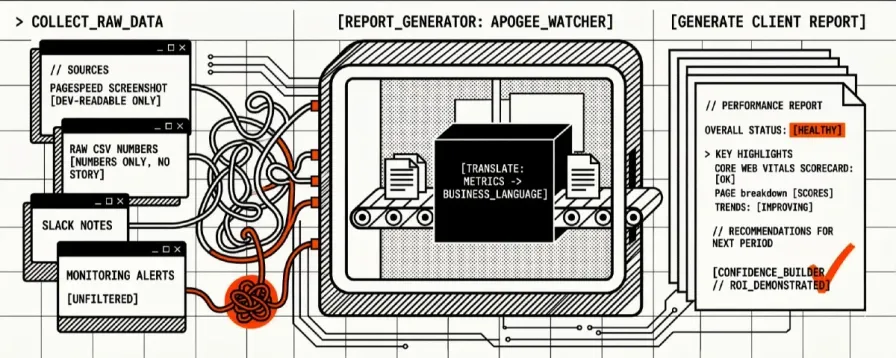
A monthly Core Web Vitals report for website clients should include overall status, LCP / INP / CLS (and performance score) for mobile and desktop, period-over-period trend, budget breaches, the top page-level regressions, what you fixed, and the next actions with owners. Screenshots alone are not a report. Neither is a single “your site is fast” email.
You spend hours pulling numbers into something you can send — and clients still miss the story. This template gives you the outline, a filled illustrative month you can copy, and a short note on which sections monitoring can populate versus which still need your narrative. Use it in Notion, Google Docs, PDF, or your agency’s branded pack.
The best client reports do three things:
- Translate technical metrics into business language
- Show trends, not just snapshots
- Recommend specific next steps
For performance budget setup, see The Complete Guide to Performance Budgets; for the operating checklist, see Core Web Vitals Monitoring Checklist for Agencies; for the retainer calendar around white-label packs, see From Scheduled Tests to White-Label CWV Reports.
Filled monthly example (illustrative)
The numbers below are a worked example for a fictional client, not a live customer dataset. Use them to see how each section of the outline reads when filled. Replace every value with your monitored history before you send anything.
// Harbour Digital — Monthly Performance Report
// Prepared for: North Harbour Outfitters
// Period: 1 Sep 2026 – 30 Sep 2026
// Prepared by: Alex Rivera (Account Manager)

---

OVERALL STATUS: NEEDS ATTENTION

Key Highlights:
> Homepage mobile LCP improved after hero image compression (3.1s → 2.4s lab).
> Product listing pages stayed within budget on desktop.
> Checkout mobile CLS breached budget after a promo banner deploy (0.18) — fix scheduled.

Sites Monitored: 1
Pages Monitored: 6
Tests Run This Period: 168 (daily mobile + desktop on 6 URLs)
Alerts Triggered: 3
Alerts Resolved: 2
// Core Web Vitals Scorecard — northharbour.example

                    MOBILE                  DESKTOP
Metric          Current  Target  Status   Current  Target  Status
─────────────────────────────────────────────────────────────────
LCP             2.4s     2.5s    OK       1.6s     2.0s    OK
INP             210ms    200ms   !        120ms    150ms   OK
CLS             0.08     0.10    OK       0.04     0.10    OK
Perf Score      78       90      !        92       90      OK

Period Change (lab, vs August):
  LCP:    ↓ 0.7s on homepage mobile (improved)
  INP:    ↑ 25ms on /products mobile (regressed)
  CLS:    ↑ 0.10 on /checkout mobile (regressed; budget breach)
  Score:  → homepage mobile 72 → 78 (improving, still under target)
// Page Performance Breakdown (mobile Performance Score)

Page            Mobile Score  Desktop Score  Status           Notes
────────────────────────────────────────────────────────────────────
Homepage        78            94             Improving        LCP fix landed 12 Sep
/pricing        88            96             Healthy          Stable all month
/contact        91            97             Healthy          —
/blog           74            90             Watch            Third-party embeds
/products       71            89             Needs attention  INP + script weight
/checkout       64            86             Critical         CLS after banner

Top Performers:
  > /pricing — Scores above target both strategies all period

Needs Attention:
  > /checkout — Mobile CLS 0.18 (target 0.10); budget alert 18 Sep
  > /products — Mobile INP 240ms peak; average 210ms
// Issues and Actions (summary)

RESOLVED:
  1. Homepage hero too large on mobile
     Impact:   LCP over 3s; homepage looked unfinished on 4G
     Fix:      Compressed hero, set dimensions, modern format
     Result:   Lab LCP 3.1s → 2.4s (mobile)

OPEN:
  1. Checkout promo banner shifts layout
     Impact:   Shoppers see content jump before pay CTA
     Priority: High
     Plan:     Reserve space / fix banner dimensions; re-test
     ETA:      8 Oct 2026

  2. /products main-thread work on mobile
     Impact:   Taps on filters feel delayed
     Priority: Medium
     Plan:     Audit third-party tags; defer non-critical JS
     ETA:      October sprint
How we fill this from Apogee Watcher
| Report section | Source in Watcher (when you use it) | Still write by hand |
|---|---|---|
| Status + alert counts | Budget breaches and email digests for the organisation | Healthy / Needs Attention / Critical wording |
| Scorecard (LCP, INP, CLS, score) | Scheduled PageSpeed Insights lab metrics; CrUX field slices when Google publishes them for the URL | Client-friendly explanations |
| Mobile vs desktop | Separate strategies on each monitored URL | Which strategy matters for this client’s traffic |
| Trends | Historical test results and dashboards | Month-over-month story in plain language |
| Top regressions / page list | Site and URL history; attention-style triage on domain reports where you use them | Business impact and priority |
| Branded PDF pack | Weekly organisation reports and white-label options on plans that include them | Monthly narrative and recommendations (monthly report period type still reserved) |
Watcher holds the evidence base. You still own the executive summary, the “so what,” and the next-step commitments. For what is live versus reserved on organisation PDFs, see Weekly Organisation Reports and White-Label Branding Options Are Live.
The Report Template
Page 1: Executive Summary
// [AGENCY NAME] Performance Report
// Prepared for: [CLIENT NAME]
// Period: [START DATE] – [END DATE]
// Prepared by: [ACCOUNT MANAGER]

---

OVERALL STATUS: [HEALTHY / NEEDS ATTENTION / CRITICAL]

Key Highlights:
> [1-3 bullet points summarizing the most important findings]
> Example: "Homepage performance improved by 15% this month after
  image optimisation. Product pages remain stable. One new issue
  detected on the checkout page (layout shift) — fix in progress."

Sites Monitored: [NUMBER]
Pages Monitored: [NUMBER]
Tests Run This Period: [NUMBER]
Alerts Triggered: [NUMBER]
Alerts Resolved: [NUMBER]
Design notes: Keep this to one page. The executive summary should be scannable in 30 seconds. Use the status indicator (Healthy/Needs Attention/Critical) as a visual anchor — green/orange/red colour coding works well.
Page 2: Core Web Vitals Scorecard
For a full overview of what is Core Web Vitals, see our practical guide. The scorecard below summarises the key metrics for clients.
// Core Web Vitals Scorecard — [SITE DOMAIN]

                    MOBILE                  DESKTOP
Metric          Current  Target  Status   Current  Target  Status
─────────────────────────────────────────────────────────────────
LCP             [val]s   2.5s   [OK/!]   [val]s   2.0s   [OK/!]
INP             [val]ms  200ms  [OK/!]   [val]ms  150ms  [OK/!]
CLS             [val]    0.10   [OK/!]   [val]    0.10   [OK/!]
Perf Score      [val]    90     [OK/!]   [val]    90     [OK/!]

Period Change:
  LCP:    [↑/↓/→] [change value] vs previous period
  INP:    [↑/↓/→] [change value] vs previous period
  CLS:    [↑/↓/→] [change value] vs previous period
  Score:  [↑/↓/→] [change value] vs previous period

Legend:
  ✓  Within target (Good)
  !  Needs attention (over target)
  ✗  Critical (significantly over target)
How to explain metrics to clients:
| Metric | Client-Friendly Explanation |
|---|---|
| LCP | "How long it takes for the main content of your page to become visible. Think of it as the moment your page looks 'loaded' to a visitor." |
| INP | "How quickly your page responds when someone clicks a button, taps a link, or types in a form. Lower is better — it should feel instant." |
| CLS | "How much your page content jumps around while loading. A low score means your page stays stable. A high score means elements shift unexpectedly, which frustrates visitors." |
| Performance Score | "An overall grade from 0-100 based on Google's analysis. 90+ is good. Below 50 needs immediate attention." |
Page 3: Page-by-Page Breakdown
// Page Performance Breakdown

Page            Mobile Score  Desktop Score  Status      Notes
────────────────────────────────────────────────────────────────
Homepage        [score]       [score]        [status]    [notes]
/pricing        [score]       [score]        [status]    [notes]
/contact        [score]       [score]        [status]    [notes]
/blog           [score]       [score]        [status]    [notes]
/products       [score]       [score]        [status]    [notes]
/checkout       [score]       [score]        [status]    [notes]

Top Performers:
  > [Page] — Score [X], consistently above target

Needs Attention:
  > [Page] — Score [X], LCP exceeds target by [Y]ms
  > [Page] — Score [X], CLS at [Y] (target: 0.10)
Page 4: Trend Analysis
// Performance Trends — Last [3/6/12] Months

[Include a simple line chart or sparkline showing score trends over time]

Month       Avg Mobile Score    Avg Desktop Score    Alerts
────────────────────────────────────────────────────────────
[Month 1]   [score]             [score]              [count]
[Month 2]   [score]             [score]              [count]
[Month 3]   [score]             [score]              [count]

Trend Summary:
  > Overall direction: [IMPROVING / STABLE / DECLINING]
  > Biggest improvement: [Page/Metric] improved by [X]
  > Area of concern: [Page/Metric] has declined [X]% over [period]
Why trends matter for clients: A snapshot tells them where they are. A trend tells them where they're heading. Clients appreciate knowing their investment in optimisation is paying off — or that a new issue needs attention before it gets worse.
Page 5: Issues and Actions
// Issues Detected This Period

RESOLVED ISSUES:
  1. [Issue description — what was wrong]
     Impact:   [How it affected the site]
     Fix:      [What was done to resolve it]
     Result:   [Improvement achieved — before/after metrics]

  2. [Next resolved issue...]

OPEN ISSUES:
  1. [Issue description]
     Impact:   [Business impact in plain language]
     Priority: [High / Medium / Low]
     Plan:     [What will be done and when]
     ETA:      [Expected resolution date]

  2. [Next open issue...]

NO ISSUES DETECTED:
  [If everything is within budget, state that clearly]
  "All monitored pages are performing within target thresholds.
   No issues were detected during this reporting period."
Page 6: Recommendations
// Recommendations for Next Period

PRIORITY ACTIONS:
  1. [Specific, actionable recommendation]
     Expected Impact: [What improvement to expect]
     Effort:          [Low / Medium / High]
     Timeline:        [When it should be done]

  2. [Next recommendation...]

OPTIMIZATION OPPORTUNITIES:
  > [Optional improvements that could further boost performance]
  > [These aren't urgent but would provide incremental gains]

UPCOMING CONSIDERATIONS:
  > [Any upcoming changes that could affect performance]
  > Examples: planned redesign, new feature launch, holiday traffic
Page 7: Appendix (Optional)
// Technical Details (for clients who want the raw data)

Test Configuration:
  Tool:           Apogee Watcher (PageSpeed Insights API v5)
  Test Frequency: [Daily / Weekly]
  Strategies:     Mobile + Desktop
  Pages Monitored: [List of URLs]

Budget Configuration:
  LCP:   ≤ [value] (mobile) / ≤ [value] (desktop)
  INP:   ≤ [value] (mobile) / ≤ [value] (desktop)
  CLS:   ≤ [value] (mobile) / ≤ [value] (desktop)
  Score: ≥ [value] (mobile) / ≥ [value] (desktop)

Raw Data:
  [Link to full test results in monitoring dashboard]
  [Or: "Available upon request"]
Report Delivery Guide
Frequency Options
| Frequency | Best For | Content Depth |
|---|---|---|
| **Weekly** | Active optimisation projects, post-launch monitoring | Scorecard + issues only (2 pages) |
| **Monthly** | Standard retainer clients | Full report (all sections, 5-7 pages) |
| **Quarterly** | Strategic review clients, low-change sites | Full report + trend analysis + strategy recommendations |
Delivery Format
| Format | Pros | Cons |
|---|---|---|
| **PDF** | Professional, branded, shareable | Static, not interactive |
| **Notion** | Interactive, easy to update | Requires client Notion access |
| **Google Docs** | Collaborative, easy to share | Less polished visually |
| **Email Summary** | Low-friction, quick to consume | Limited depth |
| **Dashboard Link** | Real-time, always current | Client must log in |
Recommended approach: Send a 2-3 paragraph email summary with the key highlights, attach the full PDF report, and include a link to the live dashboard for clients who want to explore further.
Email Template for Report Delivery
Subject: [CLIENT NAME] — Monthly Performance Report ([MONTH YEAR])

Hi [CLIENT NAME],

Here's your monthly performance report for [DOMAIN].

Quick summary:
- Overall status: [HEALTHY / NEEDS ATTENTION]
- Average mobile performance score: [SCORE] ([↑/↓] [CHANGE] vs last month)
- [1 key highlight or achievement]
- [1 item to note, if applicable]

The full report is attached. [If applicable: We've also included
recommendations for [SPECIFIC AREA] that could improve [SPECIFIC METRIC].]

Let me know if you'd like to discuss any of the findings.

Best,
[YOUR NAME]
[AGENCY NAME]
Customization Tips
When All Metrics Are Red
If every metric is over budget, don't bury the lead. In the executive summary, state clearly: "Performance needs immediate attention. All Core Web Vitals are currently over target." Then prioritise: list the single biggest issue (usually LCP or overall score) and the one fix that would have the most impact. Avoid overwhelming the client with a long list — give them one clear next step. Offer a call to discuss a remediation plan.
For Non-Technical Clients
- Remove the appendix section entirely
- Use the client-friendly metric explanations (from Page 2)
- Focus on the "so what?" — not what the numbers are, but what they mean for the business
- Replace metric names with plain language: "loading speed" instead of "LCP"
For Technical Clients
- Include the appendix with raw data
- Add Lighthouse audit screenshots for context
- Reference specific recommendations from PageSpeed Insights diagnostics
- Include code-level suggestions for fixes
For Enterprise Clients
- Add a "Compliance" section showing SLA adherence
- Include uptime and availability alongside performance
- Add year-over-year comparisons
- Include competitive benchmarking if data is available
Generating Reports Automatically
Building these reports manually for every client every month does not scale. The checklist:
- [ ] Use a monitoring tool that stores historical test data
- [ ] Export or pull data for each client (dashboard, PDF, or API where your plan includes it)
- [ ] Automate the scorecard section (current values, status, trends)
- [ ] Manually write the executive summary, issues, and recommendations (this is where your expertise adds value)
- [ ] Package the PDF with your agency branding
In Apogee Watcher, scheduled tests, budgets, and history already feed the scorecard. Weekly organisation PDFs and white-label branding options are live on plans that include those features. A dedicated monthly report period type is still reserved — many agencies assemble the monthly client narrative from weekly packs plus the outline above. Confirm flags on Pricing and My Account before you promise packaging in a scope of work.
Get this outline on GitHub
The report outline and delivery email template live in client-cwv-report-outline (CC0).
Browse the full set in core-web-vitals-checklists · Apogee on GitHub.
FAQ
What should a monthly Core Web Vitals report include for website clients? Overall status, LCP / INP / CLS and performance score for mobile and desktop, trend versus the prior period, budget breaches, top page-level regressions, issues resolved, open actions with ETA, and clear next steps. Use the filled example above as the shape; replace illustrative numbers with your monitored data.
How often should I send performance reports to clients? Weekly for active optimisation projects or post-launch monitoring. Monthly for standard retainer clients. Quarterly for strategic reviews or low-change sites. Match frequency to client expectations and how often performance changes.
What format works best for client reports? Most agencies send a 2–3 paragraph email summary with key highlights, attach a full PDF report, and include a link to the live dashboard. PDF is professional and shareable; the dashboard gives clients real-time access when they want it.
How do I explain Core Web Vitals to non-technical clients? Use client-friendly language: LCP = "how long until the main content is visible"; INP = "how fast the page responds when you click"; CLS = "how much the page jumps around while loading"; Performance Score = "an overall grade from 0–100." Focus on the business impact — SEO, conversion, user experience.
Should I include raw PageSpeed data or just the summary? For non-technical clients, stick to the scorecard, trends, and recommendations. Add an optional appendix with raw data for technical clients who want it. Never lead with raw data — lead with status (Healthy/Needs Attention) and key highlights.
What you can achieve: You can send client-ready CWV reports without spending hours in spreadsheets — status, scorecard, trends, and next steps in one place.
Want scheduled evidence and branded weekly organisation PDFs behind that narrative? Start with a free Apogee Watcher account — no credit card required — and confirm report flags on your plan before you promise packaging.