Twenty-five WordPress client sites and a spreadsheet is a familiar agency shape. PageSpeed Insights still works for one-off checks, but nobody wants to re-run the same URLs every Monday, and the account team keeps asking for a number they can quote in monthly client reviews. At that portfolio size, cheap pagespeed monitoring for agencies stops meaning “find a lower list price on one tool.” It means whether your maths is per monitored URL or per organisation, and whether one subscription can cover the portfolio without surprise line items when you add client twenty-one.
What follows is a buyer map for teams who need multi-tenant website monitoring under $100/month without pretending a free checker is a monitoring system. We compare flat organisation caps to per-site tools, name what free tiers actually cover, and show where Apogee Watcher Professional fits before you need Agency pricing. For stack assembly after you pick a price band, pair this with 3 Agency PageSpeed Stacks for 2026.
Why agency PageSpeed monitoring stops fitting under $100 at twenty sites
The break point is rarely the headline monthly fee on a pricing page. It is how capacity is counted.
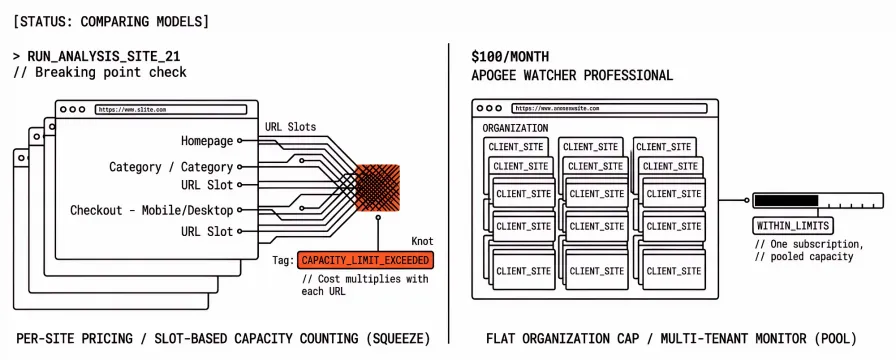
Per-site or per-monitor products multiply cost by clients, regions, devices, and priority URLs. A tool that charges per monitored slot can look affordable on one brochure site and expensive when each client needs homepage, category, and checkout on mobile and desktop. Uptime suites that bundle a small PageSpeed monitor allowance face the same squeeze: you are buying infrastructure monitoring first, with speed as a sidecar.
Flat organisation caps invert the maths. One subscription applies to the whole customer account: pooled sites, pooled monthly PageSpeed tests, pooled workspaces for client separation, and team seats that do not reset per domain. You are not charged again when site nineteen joins the portfolio. That is the wording agencies should look for in performance monitoring pricing for agencies copy, not a vague “unlimited” badge on a landing page.
Premium RUM and deep lab suites (DebugBear, SpeedCurve, Calibre) solve different problems at different price points. We are not arguing they are overpriced for a single high-traffic client site. The narrower job here is scheduled lab and CrUX-backed checks across many brochure and commerce sites when the ops budget has a three-digit ceiling.
Per-site pricing versus flat organisation caps
| Pricing model | How capacity is counted | Feels cheap when… | Hurts at 20–40 sites when… |
|---|---|---|---|
| Per monitored URL / slot | Each URL + analysis profile consumes capacity | You monitor one client deeply | Every new client multiplies slots (region × device × priority page) |
| Per-site SaaS seat | Billing scales with domains or properties | Portfolio is under five sites | Retainer count grows faster than tool budget |
| Flat org cap (multi-tenant monitor) | Sites, tests, workspaces pool under one subscription | Roster grows inside published limits | You exceed site or test caps and need the next tier |
| DIY scripts + API | Infrastructure cost is low; labour is not | One engineer owns automation | Quota, auth, reporting, and on-call belong to you |
Apogee Watcher uses customer-level limits across every workspace and site under the account. Sites, monthly PageSpeed tests, workspaces, and team members pool at the subscription layer. Adding a client site does not mint a new per-domain invoice line. Organisation-scoped prospecting for leads is still largely an internal MVP today; confirm the features page and Feature Disclaimer below before you assume every agency seat can run prospect workflows in-app.
What free PageSpeed tools cover before you buy anything
Free tools are strong diagnostics. They are weak portfolio systems unless you wrap them in your own scheduling, history, and access control.
PageSpeed Insights remains the default manual check: Lighthouse lab data plus CrUX field slices where Google publishes them. It is the right tool for explaining one URL to a sponsor. It does not give you twenty clients in one dashboard, regression alerts, or six months of history for account reviews.
The best free PageSpeed monitoring tools roundup walks WebPageTest, Lighthouse CI, Pingdom’s free tier, and similar options in more depth. The short version for agency buyers: free stacks win on education and post-deploy proof. They lose on multi-site schedules, role-based access, and client-ready reporting without glue code.
If you are still deciding whether manual checks are enough, read PageSpeed Insights vs Automated Monitoring: When Manual Checks Aren't Enough. The under-$100 question assumes you already crossed that line for at least part of the portfolio.
GTmetrix and StatusCake limits at agency scale
Two names appear constantly in “cheap monitoring” threads. Both publish list prices. Neither is a full multi-tenant PageSpeed portfolio product at the lowest tiers.
GTmetrix
GTmetrix is a credible Lighthouse-based lab debugger with optional monitoring slots on PRO plans. Capacity is counted in monitored slots: one URL plus its analysis profile (region, device, connection) consumes a slot. PRO list prices on GTmetrix’s customise page run from roughly $4.99 to $49.99 per month on yearly billing at time of writing, with Expert listing 50 monitored slots on the same page. Lower tiers include fewer slots and single-seat access until Expert.
For a deeper GTmetrix versus Watcher split, see GTmetrix vs Apogee Watcher: PageSpeed Monitoring for Agencies Compared. The pricing takeaway here: a $50/month PRO plan can still be the wrong economics for twenty clients if each client needs multiple priority URLs and profiles.
StatusCake
StatusCake pricing lists Superior at about $20.41 per month (annual billing) with 15 page speed monitors, and Business at about $66.66 per month with 30 page speed monitors at time of writing. That fits under $100 on paper.
The trade-off is product shape. StatusCake is primarily uptime, SSL, and domain monitoring with PageSpeed as a bounded add-on. Fifteen or thirty speed monitors is workable for a focused URL list, not for “every client homepage plus checkout plus campaign landing page” without hard prioritisation. Team seats on Business list nine members, which is closer to agency reality than single-seat lab tools, but you are still allocating monitors, not organisations with roles and budgets.
Confirm both vendors’ current numbers before you buy. This section cites public pages only; we do not maintain a live price scraper.
DIY PageSpeed Insights API: cheap until quota and maintenance stack up
The DIY stack from agency PageSpeed stacks looks inexpensive on a spreadsheet: Google’s PageSpeed Insights API, Lighthouse CI in repos you control, a cron job or n8n workflow, and a spreadsheet tab the account team can open.
The hidden costs show up in operations:
Quota and backoff. API projects carry daily limits. A growing URL list plus mobile and desktop strategies multiplies calls. Retries after failures burn quota faster than a calm Monday spreadsheet suggests.
No portfolio UX. Engineers see JSON and logs. Account managers want “which client regressed” without SSH.
Ownership. When the engineer who built the script is on holiday, monitoring pauses unless runbooks are excellent.
Reporting. Exporting charts for monthly client packs still means manual assembly unless you built that too.
DIY can remain the right layer for CI gates on templates you deploy. It is a fragile primary system for twenty-plus client origins unless someone is paid to maintain it. Lighthouse CI vs Managed Monitoring: Build vs Buy for Agencies is the longer build-versus-buy treatment.
Watcher Professional under $100 versus Agency when the portfolio grows
Apogee Watcher publishes list pricing on the pricing page. Two tiers matter for this buyer job.
Professional ($79/month USD at list)
Professional is the under-$100 answer for many agencies in the brief’s 20–40 site band, with honest caps:
Up to 25 sites on the subscription
2,500 PageSpeed tests per month (pooled; mobile and desktop each count when both run)
Three workspaces (organisations) for separating clients or brands
Daily, weekly, or monthly schedules
180-day retention, PDF and white-label reports, email and Slack alerts, AI insights within the test quota
Twenty brochure sites on weekly mobile checks is roughly eighty tests a month before you add desktop, discovery runs, or extra URLs per client. That usually fits inside 2,500 if schedules stay disciplined. The constraint to watch is sites, not tests, once you pass twenty-five properties.
Agency ($199/month USD at list)
Agency steps above the $100 ceiling but answers the next failure mode: unlimited sites, 10,000 tests per month, fifteen workspaces, hourly schedules, webhook alerts, API access, and leads management features on the plan. Choose Agency when Professional’s site or workspace caps bite before your client count does.
Neither tier charges per domain. Limits are flat org caps at the customer account level, consistent with the pricing FAQ on the same page.
| Tier | List USD/month | Sites | Tests/month | Workspaces | Fits when… |
|---|---|---|---|---|---|
| Professional | $79 | 25 | 2,500 | 3 | Most of portfolio under twenty-five sites; under-$100 budget |
| Agency | $199 | Unlimited | 10,000 | 15 | Roster or URL depth exceeds Professional caps |
For setup after you pick a tier, Getting Started with Apogee Watcher: A Step-by-Step Setup Guide walks organisation → site → schedule → budgets without repeating agency kickoff process here.
Honest limits on Free and Personal tiers
Evaluation tiers are useful. They are not the twenty-client answer.
Free (post-trial) includes one site, fifteen tests per month, monthly frequency only, fourteen-day retention, one team member, and no AI insights or PDF reports. Personal ($9/month) raises you to one site, one hundred tests, weekly or monthly schedules, and AI insights within that quota. Both are single-workspace shapes.
Do not plan a portfolio on Free or Personal and assume you will “upgrade later” without rescheduling every site. Frequency and retention change when you move up. Sales conversations go better when you name that upfront instead of surprising the account team mid-engagement.
Roadmap items from our content standard still apply: Slack and webhook delivery are listed as coming soon in places where only email is live today; organisation-scoped leads RBAC for every tenant seat is not fully self-serve yet. Say “supports” only for what your tier includes today on the pricing page.
How to choose a stack for 20–40 WordPress or Shopify clients
A practical sequence:
Count priority URLs, not just domains. Homepage-only monitoring is cheap. Checkout, category, and campaign paths multiply tests.
Pick pricing maths. If per-slot tools exceed $100 before you cover the portfolio, shift to flat org caps or accept a thinner URL list.
Keep a debugger. GTmetrix or WebPageTest can stay in the stack for investigations without owning schedules.
Name the reporting owner. If client PDFs are monthly, confirm whether your tier includes white-label exports without an Enterprise quote loop.
Pilot on ten URLs. Run four weeks of scheduled tests before you promise monitoring in every SOW.
If you want feature checklists beyond price, the PageSpeed monitoring tools comparison remains the taxonomy reference. The pricing maths and tier caps above are the budget lens on that map.
FAQ
Can I monitor 40 client sites under $100/month?
Not on Watcher Professional as listed today: the site cap is twenty-five. StatusCake Business lists thirty page speed monitors under $100 but does not replace a multi-tenant CWV workflow for every client URL. Realistic under-$100 strategies combine a flat-cap monitor on priority origins plus free diagnostics on long-tail pages, or split clients across two workspaces only if your tool allows it within caps.
Is multi-tenant website monitoring the same as managed service provider network monitoring?
No. Search results for generic “multi-tenant monitoring” often mean remote management or infrastructure suites. Agency PageSpeed buyers care about scheduled Lighthouse and CrUX-backed checks, budgets, and client reporting on public marketing and commerce URLs. Use infrastructure tools for servers; use a PageSpeed portfolio product for ongoing Core Web Vitals work.
Why not just use GTmetrix PRO at $50/month?
You can, for a narrow URL list and deep lab work. Slot maths still apply: regions, devices, and multiple URLs per client consume monitors quickly. Expert tier adds seats and slots but may still be the wrong shape if you need organisation boundaries and pooled history across twenty client sites.
Does Watcher charge per domain?
No. Subscription limits pool at the customer account across workspaces and sites. Adding a site consumes a site allowance, not a new invoice line. Test usage pools the same way.
What should I tell procurement about “cheap” monitoring?
Quote flat org caps, included test volume, retention, and seats. Compare three-year labour on DIY scripts against $79–$199/month managed coverage. Avoid comparing a $79 portfolio monitor to a $400 RUM seat on one high-traffic client site; those are different jobs.
Start under $100, plan for the portfolio you are selling next year
Affordable multi-tenant performance monitoring under $100/month is achievable when you stop multiplying per-site tools across a growing WordPress or Shopify portfolio and pick flat organisation caps that match how agencies actually bill ongoing client work. Free checkers stay in the stack for teaching and one-off checks. GTmetrix and StatusCake can fit narrow monitor counts if you accept their product shape. DIY PageSpeed Insights automation stays cheap until quota, reporting, and on-call belong to your team.
Watcher Professional is our deliberate answer in that band: twenty-five sites, pooled tests, three workspaces, and client-facing reports without per-domain pricing. When the portfolio outgrows those caps, Agency is the published step up, not a surprise overage invoice.
Start a free trial on Professional-shaped workloads, or run a check on a client URL before you move schedules into the app.
References
PageSpeed Insights (Google)
PageSpeed Insights API (Google)
GTmetrix PRO customise and pricing (GTmetrix)
StatusCake pricing (StatusCake)
Apogee Watcher pricing (Apogee Watcher)
Best Free PageSpeed Monitoring Tools (Apogee Watcher)
GTmetrix vs Apogee Watcher: PageSpeed Monitoring for Agencies Compared (Apogee Watcher)
3 Agency PageSpeed Stacks for 2026 (Apogee Watcher)
Lighthouse CI vs Managed Monitoring: Build vs Buy for Agencies (Apogee Watcher)
Getting Started with Apogee Watcher: A Step-by-Step Setup Guide (Apogee Watcher)
Comparing PageSpeed Monitoring Tools: Features Agencies Need (Apogee Watcher)
PageSpeed Insights vs Automated Monitoring: When Manual Checks Aren't Enough (Apogee Watcher)