Google’s crawling infrastructure docs now include a dedicated page on how to allow Google-Agent traffic through a content delivery network, web application firewall, or bot-detection service. The page exists for a practical reason: agencies and hosts have spent years tightening “block AI agents” packs, so user-triggered agents that run on Google’s infrastructure often never reach search, product detail, or checkout. Allowlisting is edge operations. It does not replace crawl readiness for indexing bots, and it does not replace lab and field Core Web Vitals on the URLs that still convert when a human loads the page. What follows is a working translation of Google’s rules for multi-tenant portfolios, plus the monitoring boundary that keeps the retainer honest.
What Google-Agent is (and what it is not)
Google-Agent is the name Google uses for agents hosted on Google infrastructure that navigate the web and perform actions when a user asks. In Google’s user-triggered fetchers table, the User-Agent strings include compatible; Google-Agent with a documentation URL, for both mobile and desktop shapes. Traffic for this fetcher uses IP ranges published in user-triggered-agents.json.
That is a different job from Googlebot, which crawls for Search. It is also a different product conversation from Google Cloud or Gemini “agent builder” marketing pages that dominate results for the bare query google-agent. When a client asks you to “allow the Google agent,” it helps to confirm they mean this crawling User-Agent and IP list, not a Vertex or Workspace product toggle.
It is also distinct from classic AI crawlers such as GPTBot. Those systems are usually discussed through robots.txt, fetch budgets, and whether the HTML becomes parseable quickly. Our earlier guide on why AI crawlers need fast, crawlable pages covers that lane. Google-Agent allowlisting sits one layer earlier on many stacks: if the WAF challenges or drops the request, crawlability and performance never get a chance.
Lighthouse’s experimental Agentic Browsing audits ask whether a page is structured for machine interaction; they do not configure your CDN. Lighthouse agentic browsing scoring belongs in the page-construction conversation. The CDN and WAF rules below belong in the edge-allow conversation.
How Google-Agent identifies requests
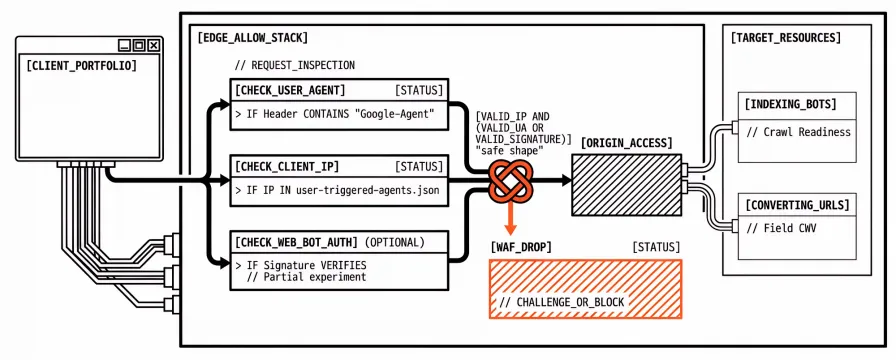
Google documents three signals, and the split matters in production: the first two (User-Agent and IP) work as the baseline today, while Web Bot Auth stays optional for as long as the experiment remains partial.
| Signal | What to check | Role |
|---|---|---|
| User-Agent | Header contains Google-Agent | Cheap first filter; spoofable alone |
| Client IP | Address is listed in user-triggered-agents.json | Makes an allow rule safe |
| Web Bot Auth (optional) | Signature-Agent is g="https://agent.bot.goog"; verify Signature / Signature-Input labelled g per RFC 9421 | Cryptographic identity when present |
Participating signed requests use the identity https://agent.bot.goog. The public key set lives at https://agent.bot.goog/.well-known/http-message-signatures-directory. Google’s Web Bot Auth guide is explicit: not every agent request is signed yet, and verification still falls back to User-Agent plus IP. A rule that only accepts signatures will fail a large share of legitimate traffic for as long as the experiment stays partial.
In provider language, the safe shape is usually: confirm User-Agent contains Google-Agent, confirm the IP is on the published list, verify the signature when headers are present, and for verified requests skip bot challenges. Matching the User-Agent string alone is not enough, because anyone can send that string. The IP check (and signatures when present) is what keeps the allow rule from becoming an open door for spoofed bots.
How to allow Google-Agent in CDN, WAF, and bot detection
Provider verified-bot or managed allowlist features are the least fragile starting point. Cloudflare, AWS WAF, Fastly, and several bot-detection vendors already document Web Bot Auth or Google crawler categories. Their supported path usually ages better than a hand-rolled regex, but the security event log still matters: a checkbox is not the same as an end-to-end journey that clears search and cart APIs.
When the rule has to be expressed by hand, Google’s four checks map cleanly into most host syntax:
User-Agent contains
Google-Agent.Client IP is in the current
user-triggered-agents.jsonranges.If
Signature-Agent/ signature headers are present, verify them againsthttps://agent.bot.goog(Web Bot Auth); if they are absent, steps 1–2 remain the authority.For requests that pass, skip interactive CAPTCHAs and JavaScript challenges as well as hard HTTP blocks.
The useful scope is the full journey, not only the homepage. Google’s troubleshooting list calls out on-site search, filtering, detail pages, add-to-cart, booking, and the underlying XHR, GraphQL, or api.* endpoints. An allow rule that only clears / still fails the moment an assistant filters a catalogue or posts to a cart API.
Load balancers and reverse proxies often rewrite the picture. When the edge sees a substituted client IP, a stripped User-Agent, or missing Signature / Signature-Input / Signature-Agent headers, verification fails even if Google sent a valid request. IP-based rules also drift after a one-time paste of ranges. Teams that already refresh other verified-bot CIDR feeds can point the same job at user-triggered-agents.json, or use a provider feed that pulls Google’s lists.
Troubleshooting when Google-Agent is still blocked
When support says “we allowed it” and journeys still die, Google’s failure modes tend to appear in a predictable order.
Rule priority. Allow rules need to evaluate before broad cloud or data-centre ASN blocks, managed bot packs, and category-level “block AI agents” policies. On agency accounts, the last pack someone enabled for “AI scraping” often sits above a carefully written Google-Agent exception. The rule order is usually the bug, not the rule text.
Interactive challenges. Skipping a 403 is not enough. Challenges still break journeys when CAPTCHA or JavaScript widgets fire on search or form submit, even after the HTML document itself loads. Agents that can fetch the first page and then stall on a widget never finish the path.
In-journey actions and APIs. Coverage has to include the paths and hosts the agent calls after the first document, because search autocomplete, filter endpoints, GraphQL, and api. subdomains are common blind spots when the homepage rule looks green in the UI and the journey still dies one click later.
Shared-IP rate limits. Multiple users’ agents share Google’s egress pool. Per-IP rate limits that treat those addresses like a single abusive scraper cut legitimate concurrency. Exempting or raising limits for verified Google-Agent ranges is the usual fix.
Stale IP lists. CDN logs that show Google-Agent User-Agents from new ranges while your rule misses them almost always point at sync, so it is worth confirming that automation still pulls user-triggered-agents.json rather than a months-old paste.
Proxy header loss. Original client IP and signature headers need to survive every hop. Stacked Cloudflare → origin WAF → application firewall setups are a frequent place where each layer “helpfully” normalises traffic and breaks verification before the application ever sees a clean request.
Both the CDN security events and the origin access log help locate the cut: requests that never appear at origin were blocked upstream, while requests that reach origin with a challenge cookie requirement still need the skip-challenge step completed.
Agency checklist for client CDNs and WAFs
Most portfolios are not one Cloudflare zone, and a short, repeatable checklist per client keeps tickets from restarting discovery every quarter:
Name the edge. Cloudflare, AWS WAF, Fastly, Akamai, host WAF, or app-level bot module, written down once.
Find the AI / bot category rules. Which packs block “AI agents” or data-centre ASNs, and where the Google-Agent allow sits relative to them.
Enable verification. Provider-supported Google-Agent / Web Bot Auth verification when available; otherwise UA + IP, with signature checks when headers are present.
Skip challenges on verified traffic. CAPTCHA and JS challenges included, not only HTTP allow.
Cover conversion paths. Homepage, search, filters, product detail, cart or booking, and API hosts.
Sync IPs. Owner, schedule, and source URL for
user-triggered-agents.json.Prove after change. A security log sample for
Google-Agentafter deploy, then lab checks on the same checkout, search, and product URLs already monitored for humans.
That last step is where PageSpeed work returns. Allowlisting stops verified agents from being rejected at the edge. It does not tell you whether LCP on the product detail page is still eight seconds after a theme release. For the difference between a one-off paste into PageSpeed Insights and a schedule you can defend in a retainer, see PageSpeed Insights vs automated monitoring.
Allowlisting is not a Core Web Vitals programme
Agencies sometimes treat “agent readiness” as a single green badge, but edge allow rules, robots.txt for crawlers, Lighthouse agentic audits, and Core Web Vitals answer different questions. Mixing them into one score produces false confidence on both the security ticket and the performance report:
Edge allow: Can a verified Google-Agent request pass CDN/WAF without a challenge?
Crawl / parse: Can indexing or research crawlers fetch and read HTML in time? (AI crawlers guide)
Agentic page structure: Does Lighthouse’s experimental category flag interaction or discoverability issues? (Agentic browsing)
Human performance: Do lab Lighthouse and PageSpeed Insights runs, plus CrUX field data, show LCP, INP, and CLS that you would put in a client report?
Synthetic schedules still matter after an edge change because WAF packs and theme deploys move on different calendars. Field data still matters because CrUX reflects real browsers, not the egress pool of an agent. For when synthetic measurement fits versus real-user monitoring, see synthetic vs real user monitoring. The tools layer; none of them replaces the others.
If agent journeys start working in staging logs but checkout still fails Core Web Vitals budgets in production, the firewall moved and the performance debt stayed. That is a clearer problem than a silent block. It is still worth scheduling and alerting on before the next client review, because the board will ask about speed long after the WAF ticket closes.
FAQ
Is Google-Agent the same as Googlebot?
No. Googlebot crawls for Search. Google-Agent identifies user-triggered agents on Google infrastructure that navigate and act on request. Allow rules and IP lists differ; the allow Google-Agent and user-triggered fetchers docs are the source of truth.
Do we need Web Bot Auth to allow Google-Agent?
Not as the only control. Google still expects User-Agent plus IP verification, and signatures are experimental and incomplete. Web Bot Auth helps when headers are present and the provider supports verification; the IP fallback stays required.
Will allowing Google-Agent open the site to spoofed bots?
A User-Agent-only allow would. Pairing the User-Agent with Google’s published IP ranges (and signatures when present) is the control Google documents. Broad bot packs can stay in place for unverified traffic.
Does robots.txt control Google-Agent the way it controls GPTBot?
Crawl directives and WAF allowlists are separate layers. A robots.txt change does not clear a Cloudflare challenge on an API path. Edge logs are the proof.
What should we tell the client after we change the WAF?
That verified Google-Agent traffic should now reach the journey paths you listed, that bot defence remains for unverified traffic, and that lab and field performance on those checkout, search, and product URLs stay on the monitoring programme because allowlisting does not measure LCP or INP.
Next step for agency teams
When a client’s “block AI” pack and a new Google allow doc collide, the durable pattern is UA + IP (plus Web Bot Auth when present), an allow rule above category AI blocks, challenge skips on the full journey, and a sync job for user-triggered-agents.json. After the edge change, checkout and search still need proof for humans. A lab check now, those URLs on a schedule with budgets, and an alert path when a theme or WAF pack regresses them again keep the retainer honest.
A multi-page domain PageSpeed check is enough to spot-check after a WAF edit. Apogee Watcher sign-up fits when the same checks need to run across many client organisations without a separate cron and key for each site. Allowlisting gets the agent through the door. Scheduled lab and field data tell you what happens after it walks in.
References
Allow Google-Agent Traffic (Google Crawling Infrastructure)
Authenticate requests with Web Bot Auth (experimental) (Google Crawling Infrastructure)
Google user-triggered fetchers (Google Crawling Infrastructure)
user-triggered-agents.json (Google IP ranges)
Why AI Crawlers Need Fast, Crawlable Pages (Apogee Watcher)
Lighthouse Agentic Browsing: How to rank in chatbots (Apogee Watcher)
PageSpeed Insights vs Automated Monitoring (Apogee Watcher)
When to Use Synthetic vs Real User Monitoring for Performance (Apogee Watcher)