October closed with site-level AI actionable insights leaving beta, a clearer site workspace for tests and reports, and a public affiliate programme for partners who already recommend Watcher. Earlier in the month we made the free domain check easier to start, showed plan usage in the topbar, opened organisation report PDFs on Starter, and added CSV export for site test history. Changelog #13 (1 Oct 2026) covered weekly organisation reports, Cloudflare-aware PageSpeed runs, and Agency lead tools. This release covers product work from early October through the end of the month. For the long-form AI announcement, see Site-Level Guidance: AI Actionable Insights Leave Beta. For partner terms, see Watcher Affiliate Programme: 30% Commission for Agencies and Publishers.
AI actionable insights leave beta
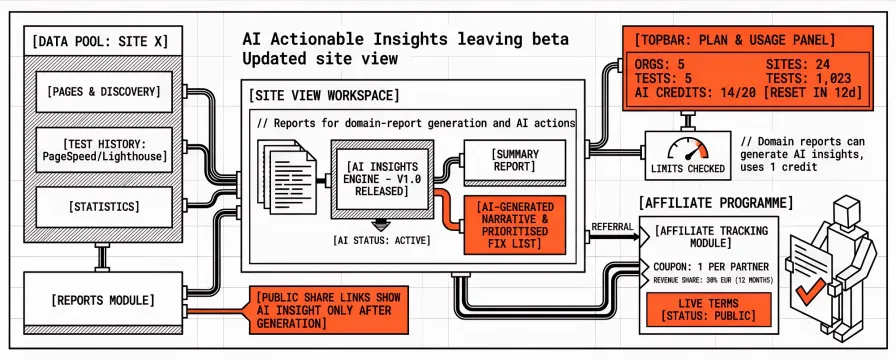
Domain report Summary already gave agencies a fixed triage view: attention-free score, top pages needing attention, and merged opportunities. What was still missing was an optional step that turns a multi-page snapshot into a prioritised fix order a developer can ship without reopening every Lighthouse tab. That step is out of beta. From a domain report in the app, Managers and Admins can generate site-level AI insights from stored PageSpeed / Lighthouse evidence for the pages in that report. The output is a short narrative, a prioritised how-to-fix list, and evidence that points at shared templates or third parties when those patterns repeat. It does not re-score the site or invent metrics that were not in the stored runs.
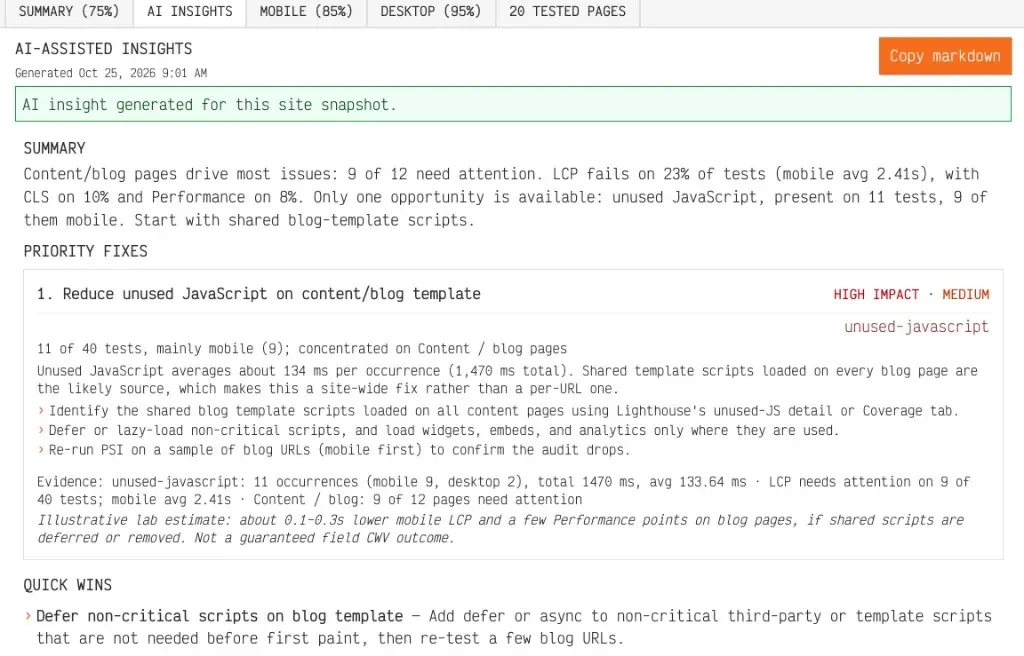
Each generate or regenerate uses one AI credit for the organisation’s current monthly period. Caps and remaining usage appear in the topbar Plan & usage panel next to sites, organisations, and tests. Default paid tiers from Personal upward include the feature; Free does not. Public share links show the insight body only after someone with access has generated a completed insight, so client links stay free of an empty AI box until you choose to share it.
Summary stays free and does not spend AI credits. Generate when you want a prioritised written plan for the site; skip it when Summary already answers the call. Detail and screenshots: Site-Level Guidance: AI Actionable Insights Leave Beta. Docs: Domain performance reports and Understand plan limits. For Summary itself, see Attention-Free Score on domain reports.
Updated site view
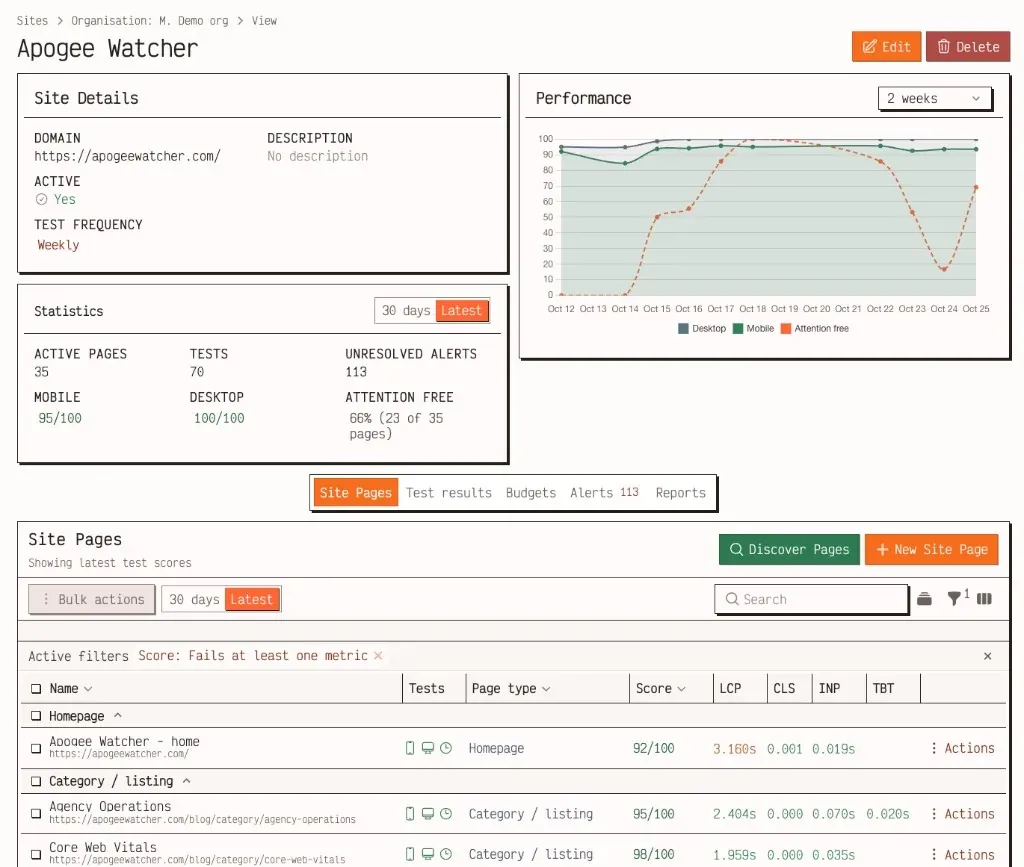
Alongside AI insights leaving beta, we refreshed the site view so day-to-day monitoring work stays on one record instead of jumping between unrelated screens. From Setup → Sites, a property opens with pages and discovery for the URL pool, test history for what already ran, statistics for recent lab movement, and Reports for domain-report generation and AI actions. Insights are only as good as the evidence behind them, so discovery and page lists decide which URLs enter the report pool, scheduled tests fill that pool, and Reports turn the results into a shareable Summary and, when you choose, an AI insight. Keeping those steps on one site record lowers the chance that someone generates an insight from an incomplete page set.
Affiliate programme
Partners who already tell clients or readers to stop relying on a once-a-week PageSpeed Insights run now have a tracked commercial path when those people choose Watcher. The public Affiliate programme page states the live terms: one coupon per partner, 30% of attributed plan revenue in EUR for 12 months after trial→paid conversion, a 30-day hold, and a €50 PayPal minimum. Attribution uses the coupon system we already use for trials, so append the coupon query to any public Watcher page, track redemptions under Account → Affiliate, and request payout when available commission clears the hold and minimum. Free plans and pure trials do not generate commission. Full announcement: Watcher Affiliate Programme: 30% Commission for Agencies and Publishers.
Free domain check: email optional, live thanks, save later
Earlier in October we simplified the public free domain check funnel. An email address is no longer required before the scan starts. You can run discovery and tests first, then add contact details when you want the report link or a save path. The thanks page shows live scores and findings grouped by page type while the run finishes, instead of a static waiting screen.
When a shared domain report is ready, anonymous viewers can leave an email on the report page to create a Free account and import the scan. Signup links from free-check mail carry the email and report token so the save step keeps that context. Hero and form controls received a small design update so the funnel matches the rest of the public site.
Use /check when you want a multi-page lab snapshot before you commit to monitoring. For how free-check reports relate to saved sites, see the help centre and pricing.
Plan usage in the topbar and quota warning emails
Organisation admins can see Sites, Orgs, and Tests usage in the signed-in topbar without opening My Account. The detail panel shows period context and a short forecast for scheduled tests through the end of the billing period.
On the subscription anniversary window, Watcher sends a warning when successful tests reach 80% of the plan budget (with a scheduled-run forecast), and a second notice at 100% when new successful runs pause until renewal or an upgrade. Quotas still renew on the subscription anniversary day, not a fixed calendar month, unless the account has no start date.
Docs: Understand plan limits and Site API usage and quotas.
PDF reports on Starter; white-label stays Professional+
Starter now includes PDF reports for weekly organisation report downloads. That matches the client-export need for small teams without unlocking agency branding. White-label reports (logo, colour, curated PDF fonts) remain a Professional and above differentiator.
If you are on Starter, open Results → Reports after a weekly run (or Preview mid-week) and use Download when a PDF exists. Branding fields on the organisation do not change the PDF theme until the plan includes white-label. See Organisation reports and PDF and White-label reports.
CSV export for site test results
From Results → Site Test Results, or from a site’s Test results tab, select rows and use bulk Export to CSV. Columns include full page URL, site, device, performance score, LCP, INP, CLS, FCP, TBT, tested-at time, status, and a link back to the result in the panel. Viewers can export selected rows; they still cannot run tests or delete results.
The Test results table also supports a score-range filter. Alert and site-notice deep links into the site-filtered alerts table resolve correctly again. Guide: Run a test and read results.
What to try
On a monitored site with completed tests, create or open a domain report and generate AI insights when your plan includes the feature. Check that the topbar AI credit meter moves, then open the public report URL and confirm the insight appears only after generation. From Setup → Sites, open the same property and walk Pages, Test results, and Reports without leaving the site record.
Run /check without an email address, wait for the thanks page to fill with scores, then save the report from the public report CTA with an email. If you are a signed-up user, In the app, open the topbar Sites / Orgs / Tests meters and confirm they match My Account and dashboard plan usage. If you are near a test cap, check whether an 80% warning would fit your anniversary period.
On Starter, Preview or open the latest weekly organisation report and download the PDF. On Professional or above, confirm white-label still applies only when that feature is on. On a monitored site, open Test results, select several rows, and Export to CSV. Open a weekly report unsubscribe link in a private window and confirm the confirm step is required.
References
Changelog #13: Weekly organisation reports, Cloudflare-aware PageSpeed runs, and Agency leads
Watcher Affiliate Programme: 30% Commission for Agencies and Publishers
Attention-Free Score: How Domain Reports Show Which Pages Need Work
Weekly Organisation Reports and White-Label Branding Options Are Live