A green mobile homepage on PageSpeed Insights makes a comforting slide, but it is not proof that the rest of the WordPress site clears Largest Contentful Paint. Agencies still close many retainers on that one URL, then meet contact, blog, or commerce templates only when Search Console or a multi-page audit catches up.
Earlier this month we published Core Web Vitals benchmarks for WordPress sites from 381 client-tagged sites (median 21 pages, 7,278 page runs). Those tables are honest store-level averages, and they still cannot answer a sharper question: when the homepage itself is fast on mobile lab LCP, how often does an inner page in the same sample still load slowly?
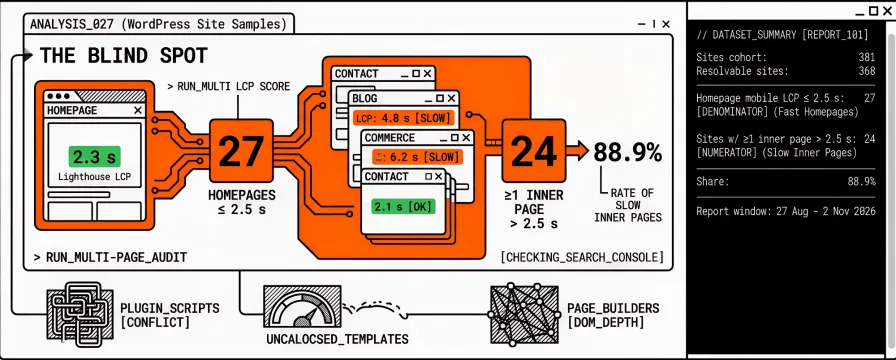
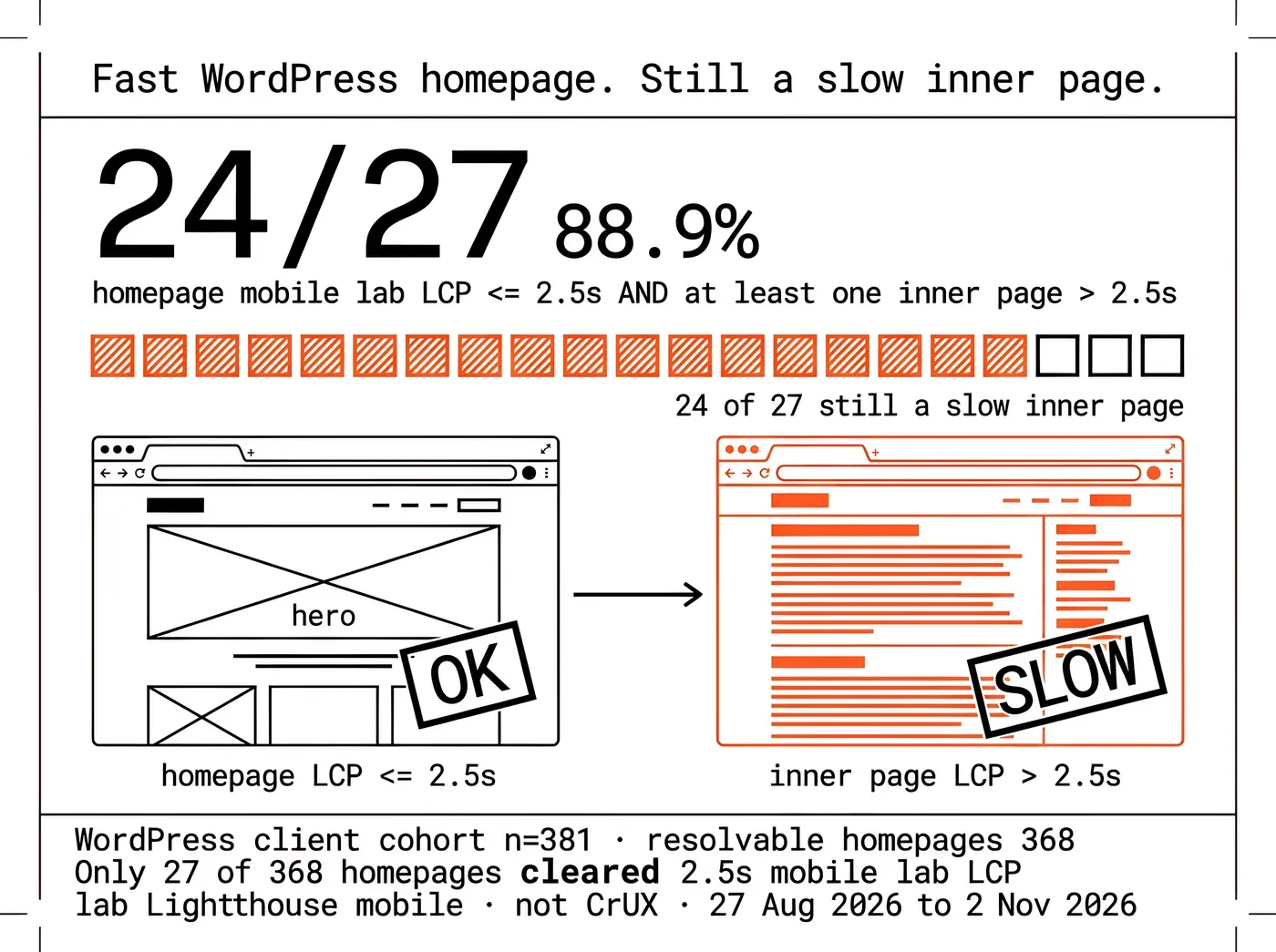
So we went back to the page results. Of sites whose homepage mobile Lighthouse LCP was ≤ 2.5 seconds, 24 of 27 (88.9%) still had at least one sampled inner page above 2.5 seconds. That is the rate you can quote when a client points at a green home score and asks whether the rest of the site is covered.
The finding: 24 of 27 fast WordPress homepages still had a slow inner page
| Slice | Count |
|---|---|
| WordPress client cohort (same as #101) | 381 |
| Sites with a resolvable homepage and usable mobile LCP | 368 |
| Homepage mobile lab LCP ≤ 2.5 s (denominator) | 27 |
| Of those, ≥1 inner page mobile LCP > 2.5 s (numerator) | 24 |
| Share | 88.9% |
| Median pages with mobile LCP in the denominator | 18 |
| Report window | 27 Aug 2026 – 2 Nov 2026 |
The scarcity of fast homepages belongs in the story, not in a footnote. Only 27 of 368 resolvable homepages cleared Google’s “good” lab LCP bar of 2.5 s, which fits a cohort whose store-level median mobile lab LCP sat near 7.5 s in the benchmark post. Among that small set, nearly nine in ten still showed at least one sampled inner URL over the same threshold, and every site in the denominator had at least one inner page with a usable mobile LCP (none were homepage-only samples).
These numbers are lab Lighthouse LCP on mobile, not Chrome UX Report field p75. We used the same 2.5 s cut on both sides so the comparison stays honest. For metric definitions, see What Are Core Web Vitals? and LCP, INP, CLS.
Why WordPress site averages cannot answer homepage vs inner page LCP
A domain report that averages Lighthouse metrics across twenty URLs is useful for portfolio triage, yet it is the wrong artefact for the homepage-versus-inner question. A site can drag a store average with slow archives while the homepage looks fine, or the reverse. Either way, averaging quietly collapses the contrast you need when a client asks, “But the homepage scored well.”
Page-level rows keep that contrast. You name the homepage URL, read its mobile LCP, then ask whether any other sampled URL on that lead exceeds 2.5 s. That is a different sentence from “the site median LCP is 7.5 s,” which is what the 2026 WordPress benchmark post correctly published for industry context.
WordPress makes the gap ordinary rather than exotic. Shared headers, page builders, plugin scripts, and uncached template paths often behave differently on / than on a deep post, a form page, or a WooCommerce path, so optimising the hero on the homepage does not automatically fix those templates. Agencies that only re-test home after a theme tweak keep shipping the same blind spot into the next review.
How we measured WordPress multi-page Lighthouse LCP
We reused the #101 cohort on purpose so the finding sits beside the published averages rather than a refreshed “today” cut that would drift the population.
The population is leads with platform_cms = WordPress, a client tag, and a domain report. We took the latest report per lead with created_at on or before 2 November 2026 23:59, which yields 381 sites. Report timestamps span 27 August 2026 09:04 to 2 November 2026 09:36, matching the benchmark window.
For the homepage we preferred a lead page with page_type_code = home whose path is /. If several home rows existed, we kept the root path; if none were typed home, we fell back to a URL whose path is /. Sites without a resolvable homepage, or without a completed mobile LCP on that page, dropped out of the homepage-resolvable set (368 of 381).
Inner pages were any other lead page with a completed mobile analysis and a non-null LCP; extra rows also typed home were not counted as inner pages for this study.
On the metric side we took the latest completed mobile LCP per page with analyzed_at on or before the domain report’s generation time. Values are stored in seconds. Homepage LCP ≤ 2.5 s puts a site in the denominator; any inner page > 2.5 s counts toward the numerator. Same cut on both sides.
We are not claiming a population CrUX pass rate for all WordPress. This is a Watcher client lab cohort, desktop is out of the headline, and field data can disagree with lab on the same URL. That disagreement is normal; it belongs in lab versus field conversations, not as a substitute for this page-level lab question.
What to do when the WordPress homepage looks fine on PageSpeed Insights
A good homepage LCP is one row in the sample, not the retainer verdict, so the useful move before the next client call is to widen the URL set and keep one gate across it.
Keep the homepage in the sample, then add the money paths you actually ship: top posts or category archives, contact or lead forms, key landing pages, and commerce templates if WooCommerce is in play. Five to ten URLs is a practical start when the book is thin. Sites in our denominator typically had a median of 18 pages with mobile LCP in the analysis set, which is more than a home-plus-one paste and still manageable in a review pack.
Use the same mobile lab LCP gate on every URL you discuss with the client. Do not call the site “good” because home is ≤ 2.5 s while contact sits at 8 s; put both numbers on the same slide. Budget the shared template rather than only the hero image: unused JavaScript, builder CSS, and third-party tags on a slow inner URL often repeat across templates even when home has been pruned. After theme, plugin, or tag changes, re-test that same URL set on a schedule. How to schedule PageSpeed monitoring test frequency across a portfolio covers cadence, and the WordPress performance monitoring guide covers CMS-specific practice.
Leave the book on homepage-only screenshots and the expensive failure mode stays open: another quarter of reviews argued from a green home while inner templates stay red.
Secondary cut when few homepages clear 2.5 seconds
Only 27 sites cleared the good homepage bar, so the primary rate sits on a thin denominator. We still publish 24 / 27 as the headline because that is the question agencies ask about “good” LCP. For context we also counted sites whose homepage mobile LCP was ≤ 4.0 s (the needs-improvement ceiling): 72 of 75 (96.0%) still had at least one inner page above 2.5 s.
Among inner page runs inside the primary denominator, 202 of 461 (43.8%) were themselves above 2.5 s. That is a page-run share, not a second site-level headline. Lead with 24 of 27, and bring in the secondary cuts when a reader asks whether the pattern holds once homepage LCP is merely “not terrible.”
FAQ
Is this the same as failing Core Web Vitals in Search Console?
No. Search Console and CrUX use field data at the 75th percentile over a rolling window, while this finding uses mobile Lighthouse lab LCP on sampled URLs. Lab can warn you before field updates; field remains the ranking and real-user clock.
Why is the denominator only 27?
In this client cohort, few WordPress homepages hit lab LCP ≤ 2.5 s on mobile. The #101 store-level median mobile lab LCP was about 7.5 s, so a small “good homepage” set is expected, and the rate among that set is still the useful quote.
Did you only test the homepage and one other URL?
No. Sites in the denominator had between 10 and 31 pages with mobile LCP in the pinned analysis set (median 18). The numerator only requires at least one inner page over 2.5 s, not a majority of pages.
Does a fast homepage hurt SEO if inner pages are slow?
Google evaluates URLs and origins with field data when enough traffic exists, so a fast home does not cancel slow templates that earn impressions. For agencies the commercial risk is clearer: you promised performance work and measured the wrong URL.
Should we ignore homepage scores?
No. Keep testing home, and stop treating it as the only row that matters.
Next step
Before the next WordPress retainer review that rests on a homepage PageSpeed Insights paste, pull one multi-page sample for that client. Mark the homepage LCP, list every sampled inner URL above 2.5 s on mobile, and keep both on the same page of the pack. Quote 24 of 27 from this cohort when you need industry context; use the client’s own page table for the statement of work.
A free domain check is enough for a same-day multi-page lab snapshot. Apogee Watcher fits when those URL checks need schedules, budgets, and history across many WordPress organisations. The homepage can stay in the deck, but it should not be the only slide.
References
Largest Contentful Paint (LCP) (web.dev)
Lab data vs field data (web.dev)
Core Web Vitals Benchmarks for WordPress Sites (2026 Data) (Apogee Watcher)
WordPress Performance Monitoring: The Complete Guide (Apogee Watcher)
What Are Core Web Vitals? A Practical Guide for 2026 (Apogee Watcher)
LCP, INP, CLS: What Each Core Web Vital Means and How to Fix It (Apogee Watcher)
How to Schedule PageSpeed Monitoring Test Frequency and Priority Across Your Portfolio (Apogee Watcher)