We have shipped the weekly organisation reports agencies keep asking for on retainers: a portfolio PDF built from scheduled PageSpeed Insights history, plus white-label branding options so the file can leave under your agency name instead of ours.
Until now, teams could already schedule tests, set budgets, and share domain-level roll-ups. What was missing was a recurring organisation-level pack that arrives without rebuilding a deck every Sunday night. That pack is live. Branding for it is live too, on plans that include white-label reports. Monthly and custom period types remain reserved for later; we say that plainly below so contracts stay honest.
If you need the full monthly retainer workflow (budgets, narrative, upsell), keep From Scheduled Tests to White-Label CWV Reports: A Monthly Retainer Workflow beside this note. What follows is the product change: what Watcher generates, which branding fields you control, and how to turn the pack on. It is the ship note, not a remake of the five-step retainer guide.
What weekly organisation reports include
Organisation reports are portfolio roll-ups for a workspace. They are not a single-URL share link, and they are not the public multi-page domain report Summary. One organisation can cover many client sites; the weekly report aggregates completed lab tests across those sites for a Monday–Sunday period. That distinction matters in client emails: a domain report answers “which URLs on this host need work after a batch run?” An organisation weekly report answers “how did this portfolio move last week, and which sites should the account lead open first?”
On a typical weekly row you will see:
Period labelled by day range (for example
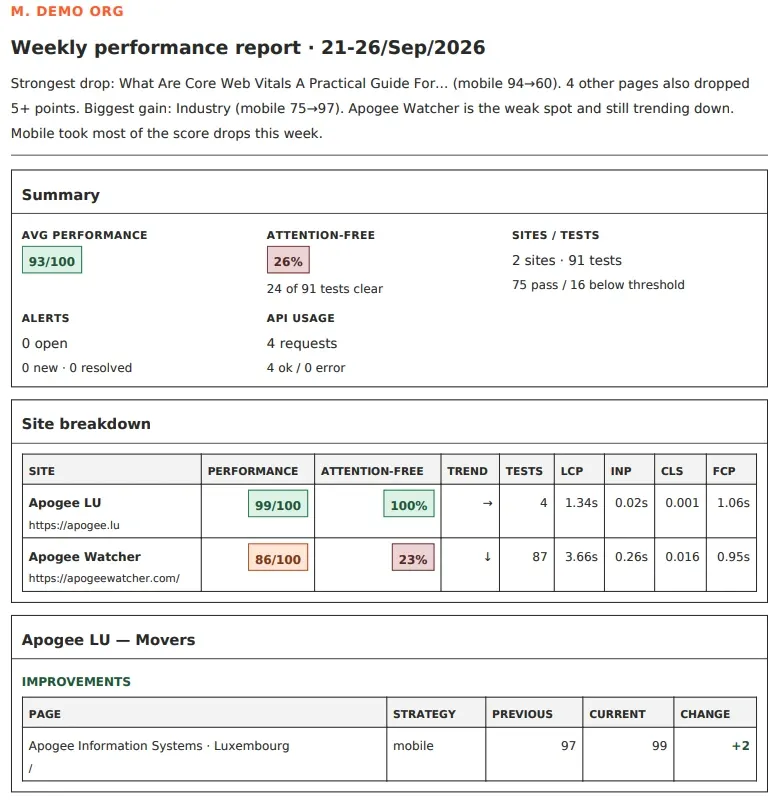
14-20/Sep/2026), with a· previewmarker when the week is still in progress.Insight summary: a short narrative built from the week’s movers (strongest drop, biggest gain, how many sites improved versus declined, alerts opened versus closed, and similar). It does not restate the KPI cards below it.
KPI cards: average Lighthouse Performance, attention-free share of tests in the period, sites and tests covered, alerts, and API usage where relevant.
Site breakdown and movers: which sites improved or regressed so account leads can open the right client first.
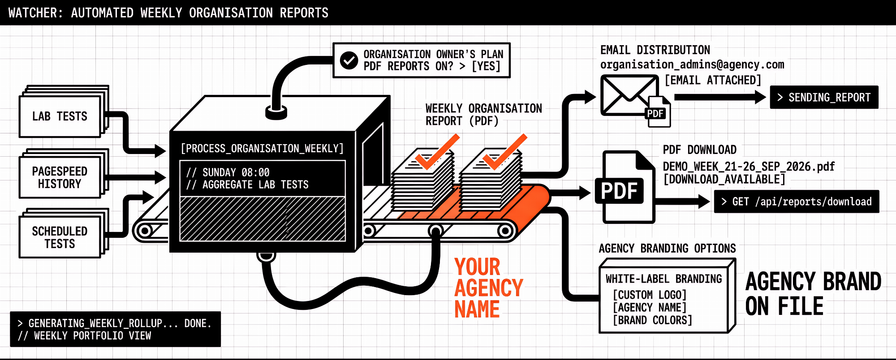
PDF download when the organisation owner’s plan includes PDF reports (typically Professional and above; confirm on Pricing and My Account).
Email to organisation admins when the Sunday job finishes, with the PDF attached when PDF reports are on the plan.
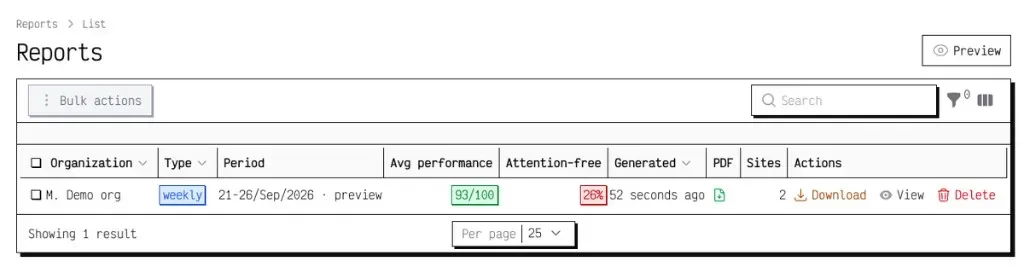
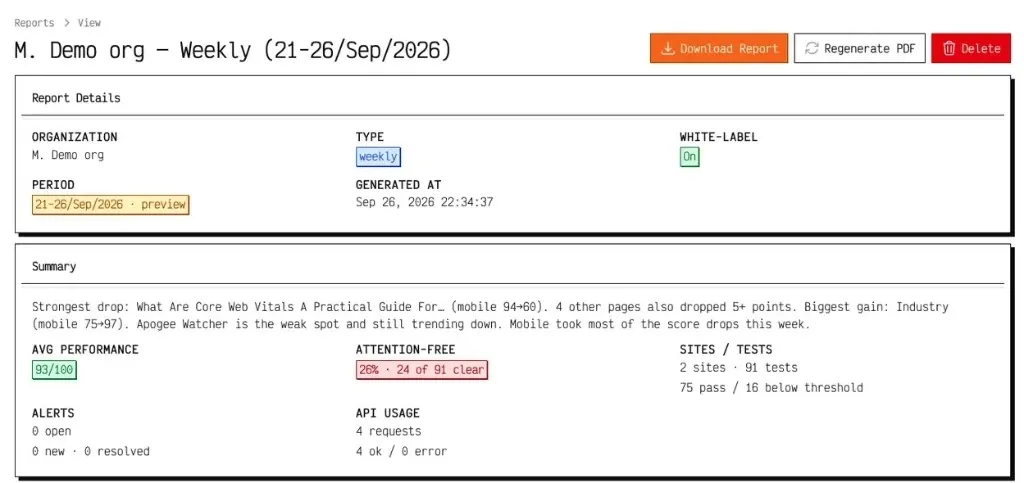
The Sunday job runs at 08:00 in the app timezone for each active organisation that had completed lab tests in the prior week. You do not author the report body in the app; Watcher builds the row from stored test history. If a Preview already exists for that week, the final Sunday run finalises it rather than leaving a duplicate. Full steps are in Organisation reports and PDF.
Scores on the row use the same lab language agencies already know from domain reports. Average performance is the mean Lighthouse Performance score over valid completed tests in the period. Attention-free percentage is the share of those tests that pass the evaluated Attention-Free gates (Performance and Core Web Vitals thresholds; accessibility, best practices, and SEO gates apply when those scores are present on the site test rows). Use those two numbers to skim the portfolio, then open movers to see which sites changed and why.
Here is a public sample PDF for the same demo week (21–26 Sep 2026): markg weekly organisation report PDF.
White-label branding options for agency PDFs
White-label packaging is a separate plan feature from basic PDF export. You can have PDF downloads without agency theming; white-label applies your logo, colour, and font when the plan includes it (typically Professional, Agency, and Enterprise; check My Account for the current flags). Confirm both PDF reports and White-label reports on My Account before you promise branded files in a client scope.
When white-label is available, open Setup → Organisations, edit the organisation, and set:
| Field | What it controls |
|---|---|
| **Report logo** | Image at the top of the weekly PDF. If empty while white-label is on, Watcher uses the default Apogee Watcher report logo. |
| **Primary colour** | Hex accent used in the PDF (for example `#ff6633`). |
| **Font family** | Choice from a curated DomPDF-safe list of Google Fonts that embed as TrueType. |

On the report view, White-label shows On or Off. New scheduled runs and Preview runs pick up current branding when white-label is on. After you change logo, colour, or font on an existing weekly row, use Regenerate PDF so the stored file matches the organisation settings. That regenerate step matters when you correct a logo the night before a client call: you do not need to wait for next Sunday.
Step-by-step branding setup is in White-label reports. For the broader case for branded packs, see White-Label Performance Reports: What They Are and Why Agencies Need Them. Contracts that promise a “fully self-serve white-label portal” still need a tier check first; the flags live on Pricing and My Account, not in a sales deck alone.
How to preview, download, and regenerate a weekly pack
A practical first week with the new reports looks like this:
Confirm schedules are running on the priority URLs for each site in the organisation.
Set organisation branding if your plan includes white-label reports.
Open Results → Reports and use Preview for a Monday→today look before Sunday. Preview does not send email.
After Sunday (or after Preview), open the row, read the insight summary and site movers, then Download Report when a PDF exists.
If branding changed after the file was built, Regenerate PDF and download again.
The Reports list puts Preview above the table and shows Download on rows that already have a PDF. The sample pack linked above is what that download looks like once generated.
If you administer more than one organisation, Preview offers a dropdown of organisation names so you do not generate the wrong portfolio pack by habit. Quiet organisations with no completed lab tests in the period simply do not produce a weekly row; that is expected, not a silent failure of the scheduler. Run Preview once after branding is saved so you can see the logo and colour on a real PDF before Sunday mail.
Download steps alone are covered in Download organisation reports. Viewers and Managers can download the same finished files Admins can; only Admins edit branding and plan upgrades. When PDF reports are off for the plan, you may still see report rows in the list, but Download appears only when a file exists.
What is live versus still reserved
Honesty here matters more than a glossy cover. Use this table when you brief account leads or write client scopes. It matches the Feature Disclaimer we use elsewhere in Watcher content: say what is live, what is reserved, and what is still coming.
| Capability | Status |
|---|---|
| Weekly organisation report (Sunday schedule) | **Live** |
| Preview current week (Mon→today) | **Live** |
| PDF download (`pdf_reports`) | **Live** on plans that include it |
| White-label logo, colour, font (`white_label_reports`) | **Live** on plans that include it |
| Regenerate PDF after branding changes | **Live** |
| Monthly organisation report type | **Reserved** (not self-serve yet) |
| Custom date-range organisation report type | **Reserved** (not self-serve yet) |
| Slack and webhook alert delivery | **Coming soon** |
| Organisation-scoped Leads Management with RBAC for every agency seat | **Coming soon** (prospecting today is largely an internal / sysadmin MVP) |
Weekly PDFs are the automated evidence pack. A monthly retainer narrative still benefits from your account lead’s prose (executive summary, work completed, next-period plan) on top of the weekly numbers. That is intentional: the product removes last-minute history gathering and brand packaging; it does not invent a full monthly story editor yet.
How this changes the monthly retainer pack
The retainer workflow post already argued that white-label without a schedule is still a branded last-minute pack. With weekly organisation reports live, Step 4 packaging is no longer “support-assisted branding and hope the deck is ready.” You can pull last week’s PDF (or four weekly PDFs) into the month-end review, keep logo and colour consistent across organisations without rebuilding Canva covers each time, and use Preview mid-week when a release week needs an early look before the Sunday mail. That is the practical change for teams who already sell a monthly performance report retainer.
The client-facing monthly report can remain one narrative PDF or slide pack. Watcher’s job is the dated evidence and the branded weekly attachment. Pair the weekly file with the client-ready Core Web Vitals report outline when you draft the retainer letter. Account leads still own the “work completed” and “next period plan” paragraphs; Watcher owns the dated scores behind those paragraphs.
FAQ
Are white label organisation reports the same as domain reports?
No. Domain reports roll up many URLs on one hostname for a shareable triage page (including attention-free score on Summary). Organisation weekly reports roll up sites inside a workspace for a period, with PDF and optional white-label branding.
Can we send an agency branded PageSpeed PDF today?
Yes, when your plan includes PDF reports and white-label reports. Set logo, colour, and font on the organisation, confirm White-label shows On, then download or regenerate the weekly PDF. Pricing and My Account show the flags before you promise a fully branded portal in a contract.
Is there a hands-off monthly organisation report yet?
Not as a self-serve monthly type. Weekly automation is live. Monthly and custom period badges are reserved for later retainer and ad-hoc packs. Until those ship, build the monthly narrative from weekly evidence plus your own outline.
Do weekly organisation reports replace Search Console?
No. Search Console remains the field and indexing source for many SEO conversations. Organisation reports organise lab-oriented PageSpeed Insights history across the portfolio. Use both layers side by side.
Who receives the Sunday email?
Organisation admins. The PDF attaches when the plan includes PDF reports.
What fonts can we use on white-label PDFs?
A curated DomPDF-safe allowlist of Google Fonts that embed as TrueType (Inter, Roboto, Open Sans, Lato, Montserrat, and similar). Pick the font on the organisation branding form; invalid or missing fonts fall back to a safe default. Full steps are in the white-label docs.
Try it on one organisation first
Pick one retainer client, confirm schedules and budgets, set branding if white-label is on the plan, run Preview, then let the Sunday job finish once. Compare the PDF to last month’s manual pack before you roll the workflow across the portfolio. That single-organisation pilot usually shows logo sizing issues, colour contrast on printed pages, and whether the insight summary matches how your team already talks to the client.
When you are ready to expand, start from sign-up or review features and pricing, then follow Organisation reports and PDF and White-label reports for the click path in the app.
References
Sample weekly organisation report PDF (21–26 Sep 2026) (Apogee Watcher)
Organisation reports and PDF (Apogee Watcher docs)
White-label reports (Apogee Watcher docs)
Download organisation reports (Apogee Watcher docs)
From Scheduled Tests to White-Label CWV Reports: A Monthly Retainer Workflow (Apogee Watcher)
White-Label Performance Reports: What They Are and Why Agencies Need Them (Apogee Watcher)
Client-Ready Core Web Vitals Report Outline (Apogee Watcher)
Attention-Free Score: How Domain Reports Show Which Pages Need Work (Apogee Watcher)
About PageSpeed Insights (Google)
Understanding Core Web Vitals and Google search results (Google Search Central)