Manager or Admin · Paid plan
Scheduled monitoring must decide which URLs to test and how often. Apogee Watcher uses two levers:
- Page priority — order when many pages are due at once
- Scheduled test frequency — cadence at site level (hourly through monthly)
Both affect monthly API usage — see Understand plan limits and Site API usage and quotas.
Set site test frequency
- Sign in at
/admin. - Open Setup → Sites.
- Edit the site.
- Find Scheduled Test Frequency (or equivalent schedule field).
- Choose Hourly, Daily, Weekly, or Monthly — only options your plan allows appear in the dropdown.
- Save.
Higher frequency increases test volume across all included pages on that site. Free-tier workspaces are typically limited to monthly scheduling.
 Edit site — Scheduled Test Frequency applies to the whole property.
Score chart default window
On the site (and site page) Performance score (daily average) chart, the period dropdown defaults from this frequency:
| Scheduled Test Frequency | Default chart window |
|---|---|
| Hourly or Daily | 2 weeks |
| Weekly | 3 months |
| Monthly | 6 months |
You can still switch the chart to 1 month, 3 months, 6 months, or Lifetime at any time. See Run a test and read results.
Set page priority
- Open Setup → Site Pages (or the site’s pages tab).
- Edit a page row.
- Set Priority:
| Priority | Label | Scheduler behaviour |
|---|---|---|
| 1 | High | Scheduled before medium and low when multiple pages are due |
| 2 | Medium | Default for important templates you promote after discovery |
| 3 | Low | Default for bulk discovered URLs |
- Toggle Included in scheduled tests off to pause a URL without deleting it.
- Save.
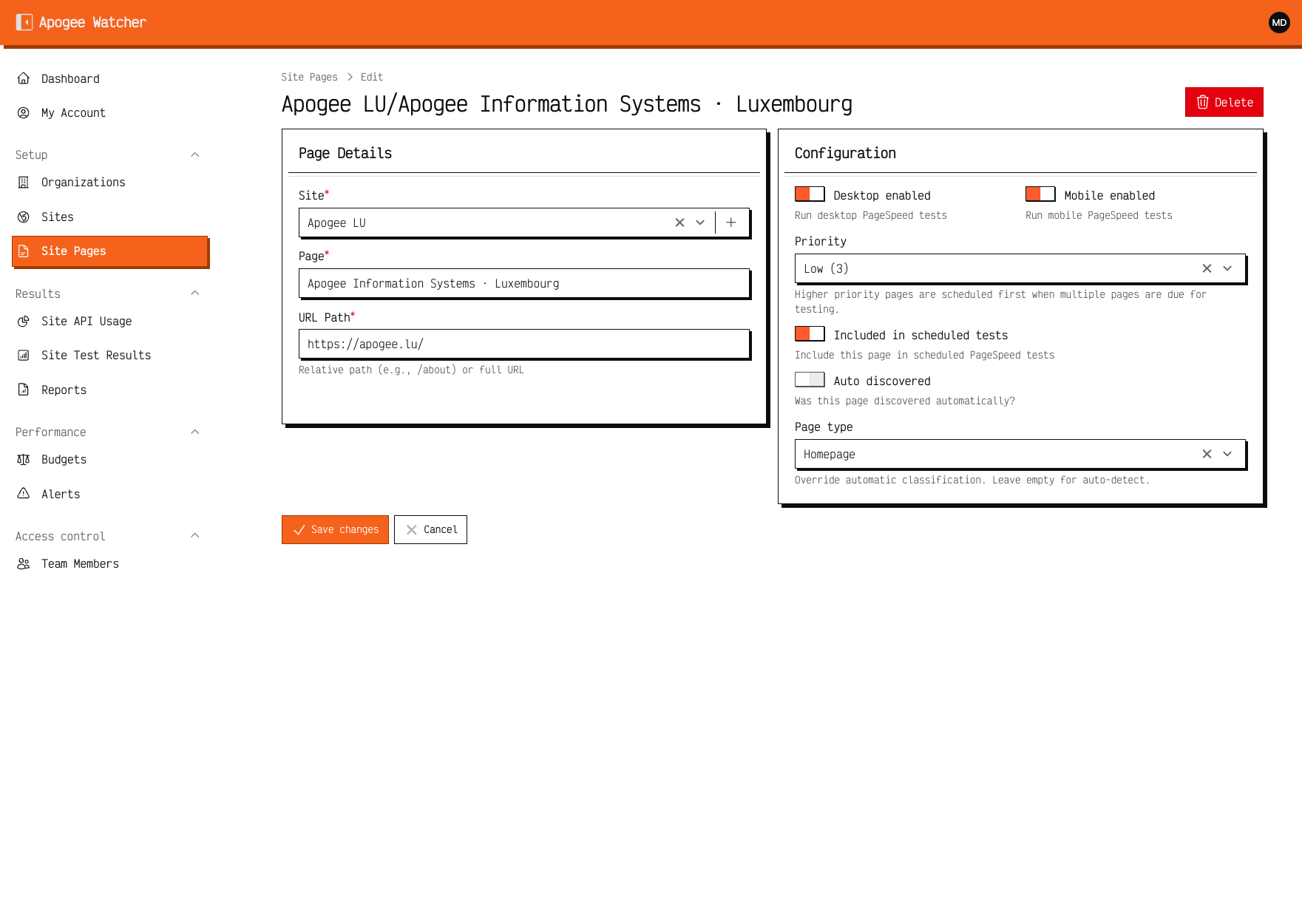 Edit site page — Priority and Included in scheduled tests.
Practical scheduling patterns
Agency client (weekly report):
- Site frequency: Weekly
- Homepage, checkout, key landing pages: High
- Blog and archive samples: Low
E-commerce catalogue:
- Site frequency: Daily or Weekly depending on plan quota
- Category and product templates: Medium
- Faceted filter URLs: exclude or Low, often Included off
Launch window:
- Temporarily raise priority on new templates
- Run manual tests between scheduled passes — Run a test and read results
Viewers
Viewers can open Site Pages and see priority labels but cannot edit frequency or priority. Point read-only colleagues to results and reports instead.
Manual Run Test bypasses the schedule for one URL immediately. It still counts toward monthly quota.