Our work during November centred on bringing Watcher evidence into WordPress and into scripts, then making how you pay match how agencies already buy software. We shipped device pairing and a site-scoped customer API, the official plugin (including Run test in v0.3.4), long-lived Watcher API keys with on-demand test jobs on Free and every paid plan, Monthly/Annual pricing with absolute yearly list prices, clearer weekly organisation report language, and a public Updates timeline. Changelog #14 closed October with AI insights leaving beta, the affiliate programme, and CSV/PDF export polish. For the long-form plugin and API announcements, see Apogee Watcher WordPress Plugin Released and Watcher API released, now available on all plans.
Watcher API keys on every plan
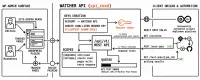
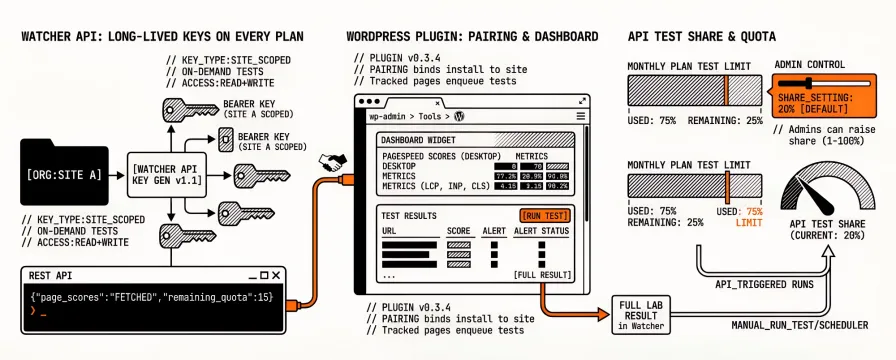
Editors got the WordPress client first. Scripts and CI still needed a thin REST door into the same multi-tenant record. Watcher API ships on Free and every paid plan. Under Account → Watcher API you create long-lived, site-scoped Bearer keys (plaintext shown once at create). Keys can read overview, pages, stored results, and alerts; optionally write Tracked pages in bulk; and optionally enqueue lab tests. A key issued for site A cannot read site B. Google PageSpeed Insights credentials stay in Watcher, so deploy hooks never paste a Google key.
Reads do not spend monthly PageSpeed Insights test quota; they appear on the Watcher API usage table (authenticated REST calls per day). Enqueued strategies still count toward the organisation’s monthly test limit, and integration-triggered runs (API keys and WordPress Run test) are further limited by an API test share: default 20% of monthly plan tests in the current anniversary window. Organisation Admins can raise that share (1–100%) from the Watcher API page. Manual Run Test in the app and the normal scheduler are not limited by the share.
Org-wide service accounts, Agency automation packaging, and hosted MCP stay later. Full announce: Watcher API released, now available on all plans. Docs: Watcher API keys and Site API usage and quotas.
WordPress plugin: scores, Tracked pages, and Run test
Agencies that live in WordPress still needed scores and alerts without managing a Google key inside yet another plugin. We shipped device authorisation and site-scoped read endpoints first, then Apogee Watcher: Automated PageSpeed Monitoring as the first official client. Pairing binds one WordPress install to one Watcher site under an organisation you already manage. Quota, schedules, budgets, and history stay in Watcher. The plugin does not rewrite themes or hold Google credentials.
In wp-admin you get a dashboard widget (latest score plus LCP, INP, and CLS), a test-results view with recent alerts beside page scores, and admin notices when Watcher has open alerts. Tracked pages on the Connection screen can bulk include or pause selected public permalinks on the Watcher schedule without deleting history. From v0.3.4, Tracked pages can also Run test per included page: the button uses the same on-demand enqueue path as Watcher API keys, shows remaining plan tests and remaining API share, and deep-links to the full lab result in Watcher. If Run test does not appear after the update, reconnect once so the install receives the enqueue grant. Self-hosted updates use Watcher’s public latest/download endpoints, so ZIP installs stay current without a WordPress.org listing (the directory submission is still open). Download and product copy live on Tools → WordPress. Pairing and Run test steps: Connect the WordPress plugin.
Treat the plugin as scores, alerts, schedule selection, and optional Run test in wp-admin. It is useful there, and it is not a full Watcher replacement. Prefer device pairing over pasting a Watcher API key into WordPress.
Annual billing on pricing and checkout
Self-serve paid plans can now renew monthly or annually. Public pricing shows a Monthly / Annual toggle (Annual is the default, labelled as two months off). Annual amounts are absolute yearly list prices in USD and EUR, not monthly × 12. Site, test, retention, and feature limits stay the same whichever cadence you pick.
Campaign and partner offers can use annual-discount coupons: those create the account and send you straight to paid annual checkout for the linked plan, with payment required to activate. Trial coupons still start a time-limited trial without a card. Affiliate commission on annual conversions uses the net EUR actually charged for the year. Docs: Subscription and renewal, Create your account, and Affiliate programme.
When a site-wide default coupon is live, the same offer can appear on public pages, as a strip on weekly organisation report emails, and on budget violation digests, so people who already open Watcher mail see the deal without hunting for a query string.
Weekly organisation reports: clearer multi-site summaries
Weekly organisation reports already roll up portfolio lab history for the prior Monday–Sunday week. November work tightened how those reports talk about sites when more than one property moved. Site comparison and multi-site summary prose are clearer for account leads who open the pack before a client call. Diagnostic tables in PDF exports render as tables again instead of opaque blobs, so the download matches what you skim on screen.
Preview, Monday finalisation, PDF feature flags, and white-label rules are unchanged from Changelog #13 and the weekly reports live note. Docs: Organisation reports and PDF.
Public updates timeline and Tools hub
The public site now keeps a running Updates timeline for product and marketing pages that change in ways customers notice. It sits next to the help centre rather than replacing Changelog posts. Use it when you want a short “what moved on the site” list without waiting for the next numbered changelog.
Under About, Tools nests a small hub including the WordPress landing and plugin download. That is how we ship the current ZIP while WordPress.org remains pending. Compare spokes and docs also gained structured data and Free-capable guide labels where the product already allows Free accounts to follow along.
Scheduling and monitoring under load
Two reliability changes matter when many sites share the same Google PageSpeed Insights budget. Scheduled strategies that already have a pending test no longer enqueue another copy of the same due run, which cuts duplicate work during busy windows. Customer site tests stay preferred over internal lead enrichment when both compete for capacity, so monitored portfolios keep moving when outreach batches are also running. Those changes are behind the scenes; you should mainly notice fewer stalled or piled-up scheduled runs.
What to try
If you manage WordPress clients, install or update to Apogee Watcher: Automated PageSpeed Monitoring v0.3.4, complete device pairing (reconnect if Run test is missing), use Tracked pages for the URLs that matter, and run one on-demand test from wp-admin. Confirm the widget and alerts match what you see on the same site in Watcher.
In the app, open Account → Watcher API, create a read-scoped key for one non-production site, call overview from a local shell, then add enqueue only when a deploy hook should spend API share. Check that the API usage table moves on reads and that Site API Usage still only counts lab runs.
On pricing, switch Monthly and Annual and confirm the yearly amounts match what you expect before checkout. If you have an annual-discount coupon, redeem it on sign-up and complete annual checkout; if you have a trial coupon, confirm the trial still starts without a card.
Open the latest weekly organisation report after a week with more than one mover and skim the multi-site summary. Bookmark Updates if you want a lightweight product trail between numbered changelogs.